
Most manufacturers do not buy a CMMS because they went shopping for one. They buy it the week after a critical line goes down for the third time, the spare part turns out to be nobody’s job to reorder, and the only maintenance record is a whiteboard someone already wiped. Unplanned downtime is the tax that pattern collects. Siemens put the bill for the world’s 500 largest companies at roughly $1.4 trillion a year, about 11% of turnover, with a single automotive line now costing up to $2.3 million per hour when it stops.
A CMMS is the system that turns reactive firefighting into scheduled, recorded, measurable maintenance. It is also one of the more confusing categories a plant will ever buy, because the word gets used for a $12-a-month app a two-person shop runs on phones and for a six-figure enterprise platform that scores asset health across forty sites. This guide separates what a CMMS actually is from what the listicles sell, then scores ten real systems on manufacturer fit and July 2026 pricing so you can shortlist by your plant, not by whichever logo shows up first.
Direct answer — What is a CMMS?
A CMMS (computerized maintenance management system) is software that plans, tracks, and records maintenance on your equipment and facilities. It centralizes work orders, preventive-maintenance schedules, an asset register, spare-parts inventory, and uptime reporting such as MTBF and MTTR, usually with a mobile app for technicians on the floor. A CMMS manages maintenance specifically; an EAM covers the wider asset lifecycle, and an ERP’s maintenance module trades depth for living inside your business system. Most enterprise vendors price by quote; several publish per-technician plans from about $20 a month.
Key Takeaways
- A CMMS runs the maintenance workflow: work orders, preventive-maintenance schedules, an asset register, spare-parts inventory, and uptime reporting (MTBF, MTTR). CMMS stands for computerized maintenance management system.
- CMMS, EAM, and your ERP’s maintenance module solve overlapping problems at different depths. Pick by whether maintenance is the job or one tab of a bigger system.
- Of the ten platforms we scored, five publish a usable per-user price and four offer a genuinely free tier; the asset-intensive enterprise end (IBM Maximo, Accruent, Limble, L2L) stays largely quote-only, as of July 2026.
- The cheapest software can carry the most expensive rollout. Implementation, integration, and asset-data cleanup routinely outrun the subscription in year one.
- Preventive maintenance is the payoff a CMMS exists to schedule. It is still the top strategy on paper while most teams spend the majority of their time reacting to breakdowns.
Methodology
How this buyer guide was scored
- Scope
- We scored 10 CMMS platforms for manufacturing and named several more for coverage, screened from an initial set of 20-plus tools surfaced by the July 2026 Google SERP for “cmms,” both AI Overviews, and our own manufacturing-software cost study. Each was assessed for a maintenance team in a discrete or process plant, not a facilities or fleet buyer.
- Sources reviewed
- Each vendor’s own product and pricing pages, read live; Capterra review counts and ratings; and primary research from Siemens, the U.S. Department of Energy, Deloitte, and the MaintainX State of Industrial Maintenance survey.
- Date range
- Pricing, tiers, free-plan availability, and vendor status verified July 2026. Review counts read the same month.
- Tools used
- The CMMS Manufacturer-Fit Rubric: four axes scored per platform, not on one cross-market scale. (1) maintenance depth (work orders, PM, condition-based triggers, parts); (2) manufacturing and asset-intensive fit; (3) pricing transparency; (4) mobile and speed of adoption.
- Limitations
- Quote-only vendors cannot be price-ranked. We ran no hands-on implementations. Capterra ratings are cited as third-party context, not our score. Feature claims reflect vendor documentation and must be confirmed against your own assets before you sign.
- Editorial independence
- No vendor named here paid for placement, ranking, or coverage. Our editorial independence rule keeps the wall explicit: Factory Investigator sells manufacturer website and SEO services, not CMMS software or CMMS implementation.
- Conflicts of interest
- Factory Investigator sells website services; none of the scored vendors were clients at evaluation time.
What is a CMMS?
A CMMS is software that plans and records the maintenance of physical assets: machines, tools, facilities, and the spare parts that keep them running. CMMS stands for computerized maintenance management system, and the name is literal. It replaces the whiteboard, the shared spreadsheet, and the binder of paper work orders with one database that everyone on the maintenance team writes to and reads from. Every hour of unplanned downtime it helps prevent is an hour of waiting, one of the eight lean wastes, that the line gets back.
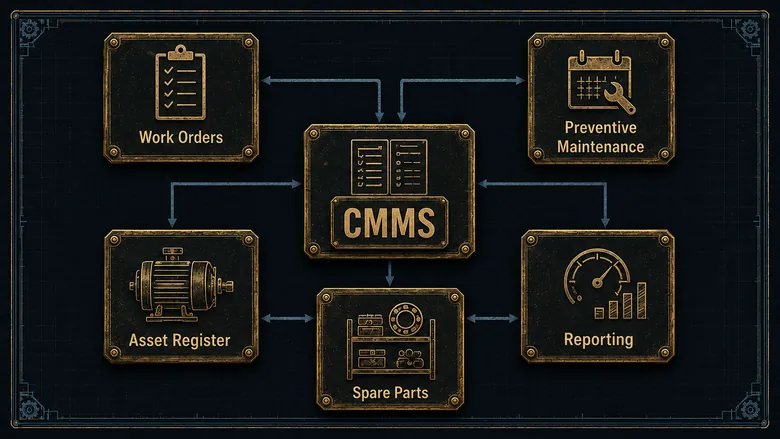
Underneath the marketing, every CMMS does the same five jobs. Master these and you can read any vendor’s feature list without getting lost.
- Work order management. Create, assign, prioritize, and close maintenance jobs, with the parts used, labor hours, and notes attached to each one.
- Preventive maintenance. Schedule recurring inspections and service by calendar date, runtime hours, or meter reading, so routine work happens before a failure, not after.
- Asset management. Keep a register of every machine with its history, manuals, warranty, and criticality, so a technician arrives knowing what broke last time.
- Spare-parts inventory. Track maintenance, repair, and operations (MRO) parts, set reorder points, and stop the “we’re out of the seal” surprise that turns a two-hour fix into a two-day one.
- Reporting. Measure the maintenance program with metrics like mean time between failures (MTBF), mean time to repair (MTTR), and PM compliance, so you can prove where downtime is coming from.
The category matters because the alternative is expensive. Preventive maintenance is the strategy most plants say they run, yet the 2025 State of Industrial Maintenance survey of 1,320 professionals found 58% still spend more than half their time reacting to breakdowns, and run-to-failure remains a named strategy for 38% of teams. A CMMS is the tool that moves work from the second column to the first, and the market is growing with that shift: analysts size the global CMMS market at about $1.40 billion in 2025, heading to $2.15 billion by 2030.
CMMS vs EAM vs ERP maintenance module
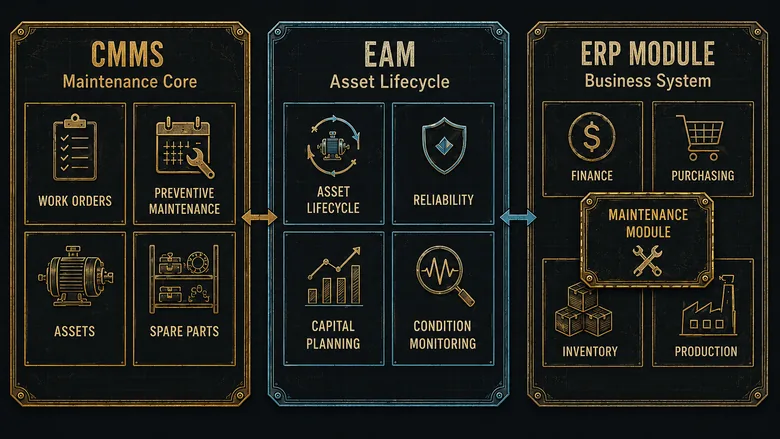
The single most common buying mistake is confusing three overlapping things: a standalone CMMS, an enterprise asset management (EAM) platform, and the maintenance module built into an ERP. They all touch maintenance. They are not the same purchase, and the Google result that answers “is SAP a CMMS or an ERP” by saying “both” is not helping you. Start here.
| System | What it is | Use when | Avoid when |
|---|---|---|---|
| CMMS | Software focused on the maintenance workflow: work orders, PM, asset history, MRO parts, uptime reporting | Maintenance is the problem you are solving and you want technicians live in weeks, not quarters | You need full asset lifecycle, capital planning, and financials in one system across many sites |
| EAM | A broader platform managing the whole asset lifecycle: maintenance plus procurement, capital planning, reliability, and often condition monitoring at scale | You run asset-intensive operations across sites and maintenance is one part of a larger reliability program | You are a single plant that just needs work orders and PM handled well and cheaply |
| ERP maintenance module | A maintenance tab inside a business system that also runs finance, inventory, and production (SAP PM, Oracle, Microsoft Dynamics) | You already run the ERP and want maintenance data in the same place as production and purchasing | Your maintenance team finds the module clunky and the mobile experience keeps them on paper |
The honest version: a CMMS is the maintenance core, and an EAM is a CMMS with the rest of the asset lifecycle wrapped around it. Many vendors on this list, IBM Maximo and eMaint especially, are sold as EAM but bought as a CMMS by plants that only switch on the maintenance functions. The ERP question is separate. If maintenance already lives inside the business system you chose when you decided which ERP actually fits your shop, a dedicated CMMS earns its keep only when the module is too rigid or too far from the floor for technicians to use. That is common, which is why the standalone category exists at all.
What a CMMS does on the factory floor
The five functions above are the anatomy. What they add up to on a real shop floor is a shorter path from “something is wrong” to “it is fixed and recorded.” A machine operator scans a QR code on the asset, files a request from a phone, and a supervisor turns it into a work order with the right technician, the right procedure, and the parts already reserved. When the job closes, the labor, parts, and downtime are logged against that asset automatically. That asset register keeps growing, too: as plants add automation, the cobots on the line become assets in their own right, with grippers, joints, and controllers that generate their own work orders. That asset register keeps growing, too: as plants add automation, the cobots on the line become assets in their own right, with grippers, joints, and controllers that generate their own work orders. That request-to-repair loop is one slice of a larger shift, because automating the factory floor itself increasingly means the sensors raise the alert before an operator ever scans a code. That downtime log is also where a CMMS meets the rest of the plant’s software, because the same stoppage surfaces in MES as an OEE hit and in ERP as lost hours, so it pays to understand how a CMMS, an MES, and an ERP each hold a different piece of the same breakdown before you wire them together.
That logged history is where the payoff compounds. Preventive-maintenance scheduling is the feature most plants buy a CMMS for, and it is what the keyword cmms for preventive maintenance is really asking about: trigger a service by runtime hours or a meter reading so the belt gets changed on schedule instead of at 2 a.m. The Department of Energy’s maintenance guidance is blunt about the return, putting a functioning preventive program well ahead of run-to-failure and a predictive program another 8% to 12% ahead of preventive. A CMMS is the scheduler that makes any of it repeatable. Every hour of downtime it prevents lands directly in Availability, the first lever in the OEE calculation, which is why a maintenance gain and an OEE gain are usually the same gain. That same logged breakdown history is what a reliability team mines when one asset keeps failing: rank the failures on a Pareto chart, then take the top one apart with the 5 Whys and fishbone that stop a machine failing the same way twice. That predictive step is increasingly an AI job, with the models that forecast a failure before it happens reading sensor data the CMMS then turns into a scheduled work order. That’s maintenance scheduling, though, not the sequencing of production work: keeping machines available is what keeps the production schedule feasible, and a plan that ignores planned PM windows breaks on contact with the floor.
PRO TIP
Before you shortlist, pull your last six months of breakdowns and rank assets by downtime hours. The top five are your criticality list. A CMMS that nails PM scheduling and parts for those five beats one with a longer feature list that your team never fully adopts. That same ranking tells you which maintenance strategy each of those assets actually earns, since predictable wear suits a fixed PM schedule while a critical, costly-to-fail machine can justify condition-based or predictive monitoring.
Two functions are worth separating from their bigger cousins, because buyers waste money conflating them. The spare-parts module in a CMMS tracks MRO inventory, the seals, bearings, and filters maintenance consumes, and its job is to stop stockouts that extend downtime. It is not a dedicated inventory system for raw materials and finished goods, and asking it to run your production stock is a mismatch. Likewise, a CMMS records what maintenance did to an asset; it does not run the line. If you need real-time production and downtime capture at the machine, that is an MES built to track run-time and scrap on the floor, feeding the CMMS rather than replacing it.
The same discipline applies to quality. A CMMS logs what maintenance did to a machine; it does not run your document control, CAPA, or audits. That is the job of the quality system you choose by the standard you must hold, which sits beside the CMMS in the stack rather than inside it. Buy each tool for the problem it was built for, then connect them. Those connections run both ways: when a control chart starts drifting toward a limit, the special cause is often a worn tool or a slipping machine, so a quality signal and a maintenance work order frequently describe the same failure from two sides.
Best CMMS software for manufacturers, compared
Ten systems, scored on the Manufacturer-Fit Rubric and grouped by the plant each one serves. Every entry covers what it is, who it fits, its standout strength, and its pricing posture verified in July 2026. Read the group headers first; they eliminate most of the list before you book a single demo.
Mobile-first CMMS for most plants
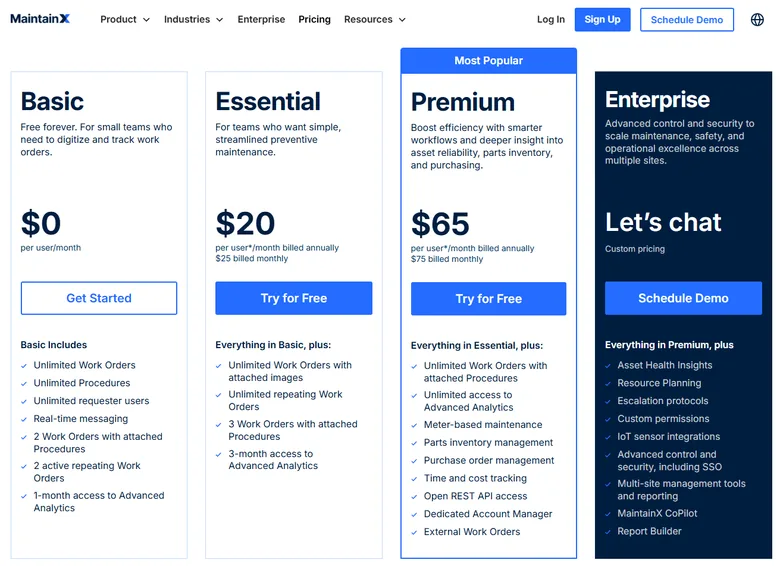
MaintainX is a mobile-first CMMS built for frontline industrial teams, strong on work orders, digital procedures, and real-time chat between shifts. Best for a plant that wants technicians using it on day one without training. Its standout is adoption: the app feels like a messaging tool, so it sticks. It is also the rare enterprise-grade option with a genuinely free plan, and publishes Essential at $20 per user per month billed annually, Premium at $65, with Enterprise by quote (as of July 2026). Capterra rates it 4.8 across more than 1,000 reviews.
UpKeep is a mobile-first CMMS aimed at small and mid-size maintenance teams moving off spreadsheets, with unlimited free requester seats so operators can file requests without a paid license. Best for shops that want a fast, phone-driven rollout. Its standout is Nova, an AI maintenance assistant included on paid tiers. UpKeep publishes Essential at $24 per user per month and Premium at $55, with Professional and Enterprise by quote (as of July 2026). Capterra rates it 4.6 across more than 1,300 reviews.
Limble CMMS is a highly configurable maintenance platform that names manufacturing as a core industry, with unlimited assets on every tier and strong KPI reporting. Best for a mid-market plant that wants power without a heavy implementation. Its standout is the balance of configurability and ease of use, reflected in a 4.8 Capterra rating across 755 reviews. Pricing is quote-only through a “calculate my price” tool; widely repeated per-user figures come from third-party blogs, not Limble’s own page, so treat it as quote-based until you get a number (as of July 2026).
Enterprise and asset-intensive CMMS (EAM-grade)
IBM Maximo Application Suite is the enterprise EAM standard for asset-intensive operations, with predictive maintenance, asset health scoring, and deep industry solutions. Best for large or multi-site manufacturers running a formal reliability program, not a single machine shop. Its standout is AppPoints licensing, which lets you deploy only the applications and users you need. IBM publishes an Essentials tier starting under $40,000 per year, with Standard and Premium by quote (as of July 2026); the entry cost tells you who it is for.
eMaint, a Fluke Reliability company, is a configurable CMMS and EAM strong in condition-based maintenance and multi-site management, with tight integration to Fluke sensors. Best for asset-intensive plants building toward reliability-centered maintenance. Its standout is in-house Fluke support and hardware-to-software condition monitoring. eMaint publishes a Team tier at $69 per user per month (three-user minimum) and Professional at $85, with Enterprise by quote (as of July 2026). Capterra rates it 4.5 across 418 reviews. Condition monitoring like this is also going visual: a camera watching for wear, leaks, or misalignment catches failure modes a vibration or temperature sensor never feels, and can open the work order itself.
Accruent Maintenance Connection is an enterprise CMMS and EAM for asset-heavy operations, with strong work-order automation, SCADA and IoT integrations, and a cloud or on-premise option. Best for multi-site industrial operations that need deep asset tracking and compliance reporting. Its standout is integration breadth into plant and enterprise systems. Accruent lists an indicative Professional price of $110 per user per month (three-user minimum), with Enterprise by quote (as of July 2026). Capterra rates it 4.4 across 444 reviews.
Manufacturing-floor and connected-worker CMMS
Fiix, owned by Rockwell Automation, is a cloud CMMS purpose-built for maintenance in manufacturing and asset-intensive plants, with an Integration Hub that connects to OT and ERP systems and an AI engine, Fiix Foresight, for work-order and parts insight. Best for plants that want maintenance data flowing into the wider Rockwell automation stack. Fiix offers a free tier (limited users, 25 active PMs) and publishes Basic at $45 per user per month and Professional at $75, with Enterprise by quote (as of July 2026). That Rockwell tie reaches down to the Allen-Bradley controllers on the line, so the maintenance data only flows once the PLCs feeding it are programmed and tagged properly.
L2L (Leading2Lean) is a connected-workforce platform whose CMMS sits beside production execution and real-time downtime dispatch, built specifically for the manufacturing floor. Best for plants that want maintenance and production solving downtime together, not in separate tools. Its standout is Dispatch, which routes floor-level issues and root-cause work in real time. Pricing is quote-only; L2L’s page shows no public figure (as of July 2026). Capterra rates it 4.5 across 95 reviews. Dispatch only knows a machine is down because a controller told it so, which is why the way your PLCs are programmed to report faults shapes how fast that routing actually works.
Free and small-shop CMMS
Maintainly is a modular, self-serve CMMS for small maintenance teams, with a genuinely free-forever plan and paid add-ons for inventory and timesheets you switch on as you grow. Best for a small shop that wants to start free and scale without a rollout project. Its standout is modular pricing plus a strong native mobile app on every tier, with the Small Business plan around $12 per user per month (as of July 2026). Asset limits make it less suited to large asset-intensive plants.
Fracttal One is an AI-assisted, IoT-driven CMMS and EAM for the full asset lifecycle, with predictive-maintenance workflows and ERP integration. Best for a mid-market plant that wants sensor-driven maintenance without an enterprise EAM’s cost. Reading a machine’s condition from live sensor data is exactly where maintenance joins the wider shift to connected, sensor-driven production, and it is usually the cheapest first step into it. Its standout is IoT and predictive tooling in a mid-market package, and it offers a free-forever plan alongside quote-only paid tiers (as of July 2026). Capterra rates it 4.6 across roughly 1,770 reviews.
PRO TIP
Worth naming for coverage beyond the scored ten: MEX and TMA Systems’ WebTMA in asset-heavy facilities, Brightly Asset Essentials and Eptura Asset (formerly Hippo) for facilities-led buyers, and FMX or Click Maint for lighter budgets. None changes the shortlisting logic below.
CMMS software comparison table
The ten scored platforms side by side. Prices are each vendor’s own published figure or “quote” where none is disclosed (as of July 2026). Ratings are Capterra unless marked; “—” means no clean public rating on a single site.
| Platform | Best-fit plant | Starting price (Jul 2026) | Free tier | Standout | Capterra |
|---|---|---|---|---|---|
| MaintainX | Most plants, mobile-first | $20/user/mo | Yes (Basic) | Real-time shift chat + procedures | 4.8 (1,047) |
| UpKeep | SMB / mid-market | $24/user/mo | Requesters free | Nova AI assistant | 4.6 (1,326) |
| Limble CMMS | Configurable mid-market | Quote | No | Unlimited assets + KPI reporting | 4.8 (755) |
| Fiix | Manufacturing + OT/ERP | $45/user/mo | Yes (25 PMs) | Foresight AI, Rockwell stack | — |
| eMaint | Asset-intensive, condition-based | $69/user/mo | No | Fluke sensor integration | 4.5 (418) |
| Accruent Maintenance Connection | Enterprise, asset-heavy | $110/user/mo | No | SCADA/IoT/ERP, on-prem option | 4.4 (444) |
| IBM Maximo | Enterprise EAM | From ~$40k/yr | No | Predictive + AppPoints licensing | — |
| L2L | Manufacturing floor | Quote | No | Downtime dispatch + production | 4.5 (95) |
| Maintainly | Small shops | ~$12/user/mo | Yes (forever) | Modular add-ons + mobile app | 4.2 (66) |
| Fracttal One | IoT / predictive, mid-market | Quote | Yes (forever) | AI + IoT predictive maintenance | 4.6 (~1,770) |
Read the table by group, not top to bottom. The published-pricing tools cluster in the mobile-first and small-shop tiers; the quote-only ones cluster at the enterprise and configurable end, where deals carry integration scope. There is no single best CMMS software. There is a best system for your critical assets, your seat count, and how far your maintenance data has to travel into the rest of your plant.
What CMMS software costs for manufacturers
CMMS pricing splits along the same line the vendor list does. The mobile-first and small-shop tools publish a per-user price you can budget without a sales call: MaintainX from $20, UpKeep from $24, Fiix from $45, eMaint from $69, and Accruent around $110 per user per month, with Maintainly near $12 (all as of July 2026). The enterprise and configurable end, IBM Maximo, Limble, L2L, and Fracttal’s paid tiers, quotes only, because those deals carry integration and asset scope a sticker cannot express.
The number on the pricing page is rarely the number you pay in year one. The pattern here mirrors what we found pricing the wider category in our manufacturing software cost investigation: the license is the visible cost, and implementation, integration, and data work are the invisible ones. For a CMMS specifically, the biggest hidden line is asset-data setup. Someone has to build the asset register, load manuals and PM schedules, and set parts and reorder points before the software earns anything. A cheap subscription with a messy asset import can cost more in labor than a pricier tool that onboards you properly.
IMPORTANT
Ask every vendor one question in writing: what does it cost to get our assets, PM schedules, and parts loaded and our technicians trained? A per-user price that looks cheap can hide an implementation quote several times the annual license, especially at the multi-site and EAM end.
How to choose a CMMS for your plant
A repeatable sequence keeps the demo theater from steering you. Five steps move you from the full market to a defensible three-vendor shortlist.
- Rank your assets by downtime. Use the last six months of breakdowns to list your five most critical machines. Your CMMS has to handle those first; everything else is secondary.
- List your must-have modules. From the five core functions, mark the non-negotiables. Most plants need work orders, PM scheduling, and parts; not every plant needs condition-based triggers or multi-site rollups on day one.
- Set a budget and a seat count. Count the technicians who need a paid license versus the operators who only file requests. That headcount, times a per-user price, is your real number, and it decides whether the quote-only tier is even worth a call.
- Shortlist three inside one group. Use the group headers above. A small plant should not have IBM Maximo and Maintainly on the same list; they answer different questions.
- Demo with a real work order and a real PM. Bring your messiest recent breakdown and one recurring service. A tool that handles your worst case beats one that handles the vendor’s clean sample, and it exposes the mobile experience your technicians will live in.
Whichever you shortlist, confirm how it connects to the systems you already run. If maintenance data needs to reach production or purchasing, the integration into your ERP or MES is not a nice-to-have; it is the difference between a CMMS that informs the business and one that becomes another island of data nobody reconciles. The John Deere repair-software settlement adds a second integration question: whether the technician can access the diagnostic and reprogramming functions needed to close the work order.
When to use which: standalone CMMS, ERP module, or EAM
The decision comes down to what maintenance is to your business and how many assets you run. Use these four rules to place yourself.
- Use a standalone CMMS when maintenance is the problem, your ERP’s module is too rigid or too far from the floor, and you want technicians productive in weeks. This covers most small and mid-size manufacturers.
- Use your ERP’s maintenance module when you already run the ERP, maintenance is light, and keeping asset data next to production and purchasing matters more than a best-in-class mobile experience.
- Step up to EAM when you run asset-intensive operations across sites, maintenance is part of a formal reliability program, and you need capital planning and condition monitoring, not just work orders.
- Start with a free CMMS when you are a small shop proving the workflow. MaintainX, Fiix, Maintainly, and Fracttal all run free tiers; treat them as a paid trial you never have to end, and upgrade when seat count or reporting outgrows the plan.
A CMMS also does not stand alone in the software stack; it records maintenance while your ERP, MES, and quality systems each record their own domain. The failure mode is asking one platform to do all of it adequately and none of it well. Decide which problem is urgent this quarter, buy the tool built for it, and wire it to the systems you already run.
Frequently Asked Questions
CMMS stands for computerized maintenance management system. It is software that centralizes maintenance work orders, preventive-maintenance schedules, an asset register, spare-parts inventory, and uptime reporting, so a plant can move from reactive breakdown repair to planned, recorded, measurable maintenance.
SAP is an ERP that includes a maintenance module (SAP Plant Maintenance, part of SAP EAM). So SAP can do CMMS work, but it is not a standalone CMMS. Plants already on SAP often still buy a dedicated CMMS when the module is too rigid or too hard for technicians to use on the floor.
A CMMS manages the maintenance workflow: work orders, PM, asset history, and parts. An EAM manages the full asset lifecycle, adding procurement, capital planning, and reliability across multiple sites. EAM is broadly a CMMS with more wrapped around it; many tools, including IBM Maximo and eMaint, are sold as EAM but used as a CMMS.
Published per-user pricing runs from about $12 to $110 per user per month (as of July 2026): Maintainly near $12, MaintainX from $20, UpKeep from $24, Fiix from $45, eMaint from $69, Accruent around $110. Enterprise platforms like IBM Maximo start near $40,000 a year and quote from there. Budget implementation and asset-data setup on top of the license.
For a genuinely free-forever plan, MaintainX Basic and Maintainly suit small teams, Fiix offers a free tier limited to 25 active PMs, and Fracttal One has a free plan. They cap assets, users, or reporting to push you toward paid tiers, but they are a legitimate way to run real maintenance and prove the workflow before you spend.
The best CMMS for your plant is not the biggest name or the longest feature list. It is the one your technicians will actually open on the floor, priced for the seats you really need, connected to the systems you already run. Rank your critical assets, shortlist three tools inside one group, and demo with a real breakdown before you sign. And if the deeper problem is that buyers cannot find or trust your shop before the RFQ ever lands, that is a different fix; our free manufacturer website investigation shows where prospects lose confidence on your site.
