
The question “what is MES in manufacturing?” rarely gets a clean answer on the shop floor, because MES overlaps with ERP, MRP, PLM, QMS, and CMMS, and every vendor wants its own layer to look like the whole system. Six acronyms, a stack of overlapping sales decks, and a five- or six-figure decision riding on your ability to tell them apart.
This guide maps the whole manufacturing software stack: what each layer does, what it owns, where the layers collide, and how they pass data to each other. Read it to place the systems, then go deep on the one layer you’re actually buying.
Direct answer — What is MES in manufacturing?
MES (manufacturing execution system) is shop-floor software that tracks, controls, and records production in real time as raw materials become finished goods. It dispatches work orders, collects machine and operator data, enforces quality checks, and builds full lot traceability. MES sits at Level 3 of the ISA-95 model, between ERP (business planning) above and PLC/SCADA (machine control) below. Unlike ERP, which plans and accounts for work, MES runs and proves the work as it happens.
Key Takeaways
- MES runs and records production on the floor; ERP plans and accounts for it. They answer different questions, and most mid-size plants eventually run both.
- The stack has six core layers: ERP, MRP, MES, PLM, QMS, and CMMS. Each one is the system of record for exactly one thing.
- ISA-95 is the map: ERP at Level 4, MES and MOM at Level 3, PLC and SCADA at Levels 0 to 2.
- PLM owns the product definition (CAD, BOM, revisions) before anything reaches the floor. It feeds ERP and MES; it doesn’t replace them.
- Overlap is the trap. ERP, MES, QMS, and inventory tools all claim similar features, so buy the layer that fixes your bottleneck, not the one with the longest feature list.
What is MES in manufacturing?
MES (manufacturing execution system) is software that tracks, controls, and documents production on the factory floor in real time, from raw material to finished product. It turns a released work order into dispatched tasks, collects data from machines and operators while the job runs, and records exactly what was made, when, on which equipment, and to what quality standard.
Three jobs separate a real MES from a spreadsheet. It dispatches and sequences work orders to cells and operators. It captures actuals in real time: run time, scrap, machine state, and labor, usually straight from the PLCs and SCADA layer beneath it. And it builds genealogy, the traceable record linking every finished unit back to its lot, machine, operator, and inspection result. The industry shorthand for the measurable outputs is the “Core Four”: work-order tracking, scheduling, overall equipment effectiveness (OEE), and downtime tracking.
This is real spend, not a niche. The global MES market was worth about US$14.47 billion in 2025 and is projected to reach US$44.67 billion by 2034, a 13.3% compound annual growth rate, per The Insight Partners. That growth is why so many adjacent tools now claim “MES features,” which is exactly what makes the category confusing. If you already know you need one and want MES software vendors matched to discrete, process, or regulated environments, the MES buyer guide scores nine systems by production fit; this page is about where MES sits relative to everything else.
The manufacturing software stack, layer by layer
The manufacturing software stack is a set of six systems that each own one job: ERP runs the business, MRP plans the materials, MES executes production, PLM defines the product, QMS governs quality, and CMMS maintains the assets. They overlap at the edges, but each is the authoritative system of record for one thing, and that “owns” column is the fastest way to tell them apart.
| Layer | What it does | System of record for | Integrates with |
|---|---|---|---|
| ERP (enterprise resource planning) | Runs the business: finance, purchasing, sales orders, inventory value, and high-level planning | Financials, customer and supplier orders, costs | MES, MRP, PLM, CRM, QMS |
| MRP (material requirements planning) | Calculates what to make and buy, and when, from the BOM and demand | Material and production plans, purchase suggestions | ERP (often a module inside it), inventory, MES |
| MES (manufacturing execution system) | Executes and records production on the floor in real time | Work-in-progress, machine and labor actuals, genealogy | ERP (up), PLC/SCADA (down), QMS, CMMS |
| PLM (product lifecycle management) | Manages the product definition from concept to retirement | The product record: CAD, BOM, revisions, specs | ERP and MES (releases BOMs and routings), QMS |
| QMS (quality management system) | Governs quality: documents, inspections, nonconformance, CAPA, audits | Quality records and compliance evidence | MES, ERP, PLM, suppliers |
| CMMS (maintenance management) | Manages maintenance: PM schedules, work orders, spares, assets | Assets, maintenance history, MRO inventory | MES (downtime/OEE), ERP, IoT sensors |
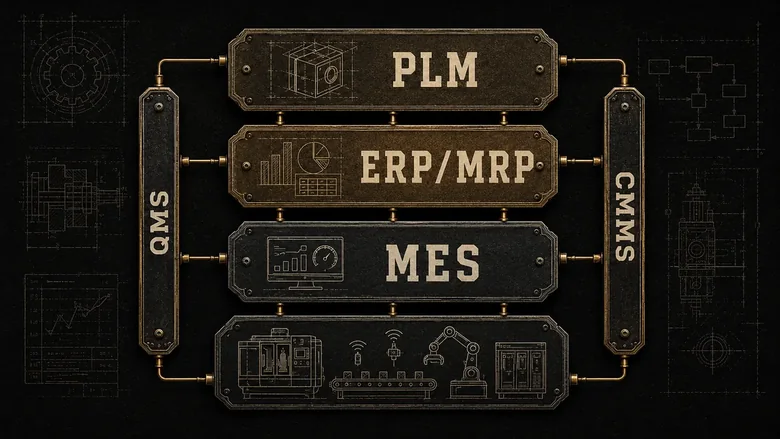
Price ranges as widely as scope does, from a few hundred dollars a month for a single-module tool to seven figures for a validated enterprise suite. Because vendors publish so little of it, we broke down what each of these layers actually costs once implementation is added in a separate study. Keep the “system of record” idea close as you read the rest of this guide: every time two tools claim the same job, one of them should own it and the other should read from it.
ERP and MRP: the planning and business layer
ERP is the business system of record: it manages finance, purchasing, sales orders, and the value of inventory, and it plans production at a high level. MRP is the calculation inside that planning job, exploding the bill of materials against demand to tell you what to make, what to buy, and when. Historically MRP came first and grew into ERP as accounting, HR, and CRM were bolted on, which is why the two are so easily confused.
The practical distinction is scope, not quality. MRP answers “what and when”; ERP answers “what, when, how much did it cost, and did we get paid.” If you’re weighing a lightweight planning tool against a full suite, the six signals that show a shop has outgrown standalone MRP are the cleanest test of which you actually need, and we won’t rehash that decision here.
When it’s time to shortlist an actual suite, match it to how you build rather than to a feature grid, because a make-to-order job shop and a make-to-stock plant need very different ERP. That’s the whole logic behind the production-model approach to choosing ERP for a small manufacturer. One more boundary worth drawing: ERP handles standard orders well, but if your product is configured or engineered per order, the pricing and BOM generation belong in a CPQ tool that turns a configurable RFQ into a manufacturable quote that then flows into ERP as a clean order.
IMPORTANT
ERP will “include” MES, MRP, quality, and inventory as modules. Those modules are real, but they’re rarely as deep as a dedicated tool. Treat “it’s all in the ERP” as a claim to test against your hardest workflow, not a reason to skip the comparison.
MES: the execution layer on the shop floor
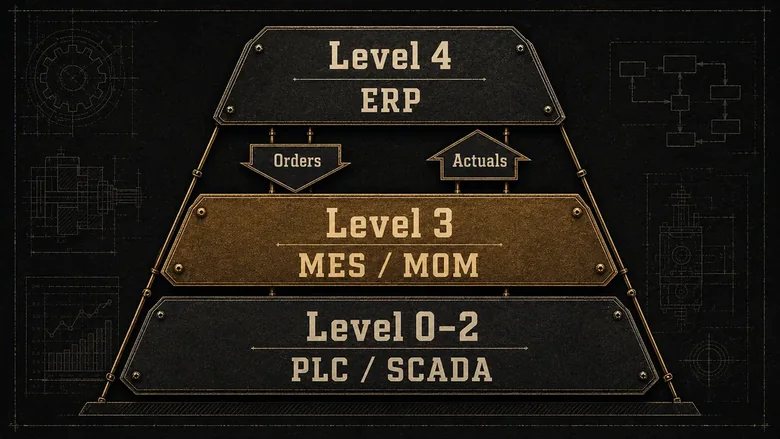
MES is the execution layer: it takes the plan ERP and MRP produce and runs it on the floor, then feeds the results back up. The heart of the MES vs ERP distinction is tempo: where ERP works in hours and days, MES works in seconds and minutes, connected directly to the machines. This is the layer that knows a job is running late while it’s still running, not at month-end close.
Its position is defined, not marketing. Under the ISA-95 standard for enterprise-control integration (also published as IEC 62264), MES lives at Level 3, between the business systems at Level 4 (ERP) and the control systems at Levels 0 to 2 (sensors, PLCs, and SCADA). Level 3 also carries maintenance, quality, and inventory-movement functions, which is why this band is often called Manufacturing Operations Management (MOM), and why the standards body MESA International maintains the B2MML schema for ERP-to-MES data exchange. When someone says “MOM” instead of “MES,” they usually mean MES plus its neighboring Level 3 functions.
Here’s the stance worth internalizing: buying MES to fix a scheduling problem that’s really an ERP data problem just automates the mess faster. MES shines when your constraint is visibility and proof on the floor, real-time OEE, downtime reasons, and lot genealogy for a recall or an audit. If your BOMs are wrong or your due dates are fiction, that’s an ERP, MRP, or PLM problem, and no execution system will paper over it. And the real-time OEE an MES streams is only as meaningful as the formula behind it, so it pays to know what a good OEE score is and how it is calculated before you read too much into the number on the board.
PLM: the product-definition layer
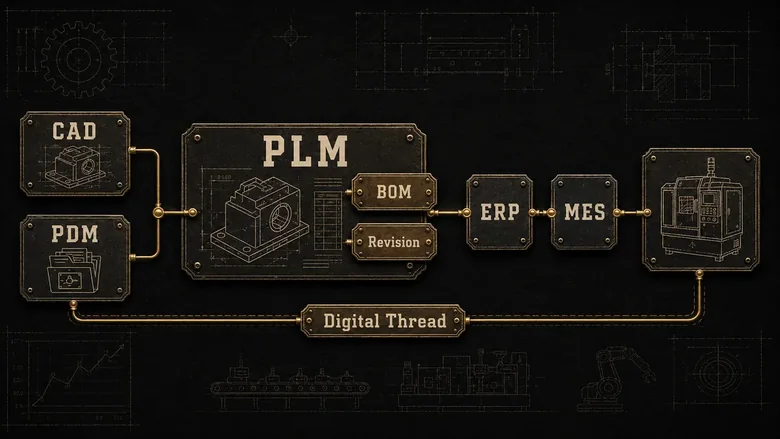
PLM (product lifecycle management) is the software that owns the product definition, managing every version of the design, the engineering bill of materials, specifications, and change history from concept to retirement. It sits upstream of production: nothing should reach ERP or MES until PLM has released a correct, current revision.
PLM is often confused with PDM (product data management), its own foundation. PDM manages CAD files and engineering documents inside the engineering department; PLM builds on that to manage the full lifecycle across engineering, manufacturing, quality, and service. The connective tissue is the digital thread, the linked record that ties a design revision to the BOM, the routing, the quality spec, and the as-built unit. Vendors you’ll meet here include Siemens Teamcenter, PTC Windchill, and Dassault ENOVIA. That design layer is also where generative AI has landed first on the factory side, with tools that propose optimized part geometries against weight and strength targets, showing how generative AI now designs the part itself before it ever reaches the floor.
Why a stack guide cares about PLM: the number-one cause of scrap and rework in a growing shop isn’t the machines, it’s building last month’s revision because the change never propagated. PLM releases the engineering BOM and the change order; ERP turns that into a manufacturing BOM and a cost; MES executes the exact revision on the floor. Skip PLM and that handoff lives in emailed PDFs and a shared drive, which works until it very expensively doesn’t. Most small manufacturers start without dedicated PLM and adopt it once engineering changes outpace what a folder structure can track.
QMS and CMMS: the quality and maintenance layers
QMS and CMMS are the two Level 3 neighbors that plants most often run as separate systems. A QMS (quality management system) governs controlled documents, inspections, nonconformances, corrective and preventive actions (CAPA), and audit evidence. A CMMS (computerized maintenance management system) governs equipment: preventive-maintenance schedules, maintenance work orders, spare parts, and asset history. Its enterprise-scale sibling, EAM (enterprise asset management), extends the same job across whole facilities and asset fleets.
Quality is where overlap gets expensive. MES captures in-line inspection data, ERP has a quality module, and PLM holds the spec, but the authoritative record of compliance, the thing an ISO 9001 or AS9100 or FDA auditor examines, belongs in the QMS. If you’re regulated, the deciding factor is which standard you must hold, which is exactly how to match a QMS to the standard rather than the brand. Buy quality software for the audit you have to pass, not the feature list. It helps to know where that in-line inspection data begins, too: the vision system that produces those pass/fail results sits on the line, feeding the MES before the QMS ever files the record.
Maintenance overlaps differently. MES reports that a machine is down and feeds OEE; the CMMS is what schedules the preventive work, dispatches the technician, and tracks the parts so the machine goes down less often. The two are complementary, and a good integration means an MES downtime event can auto-open a maintenance ticket. For plants where reactive maintenance is the real bottleneck, the practical starting point is understanding how a CMMS schedules preventive maintenance and manages work orders before layering it onto the rest of the stack. Whether that recurring work should fire on a fixed calendar or only when sensors flag a developing fault is the preventive-versus-predictive decision behind every maintenance plan.
PRO TIP
Before you evaluate any two systems, write down the one number each is supposed to move: on-time delivery, OEE, scrap rate, audit findings, unplanned downtime. If two tools claim the same number, you have an overlap decision to make before you have a purchase to make.
How the layers integrate (and where they overlap)
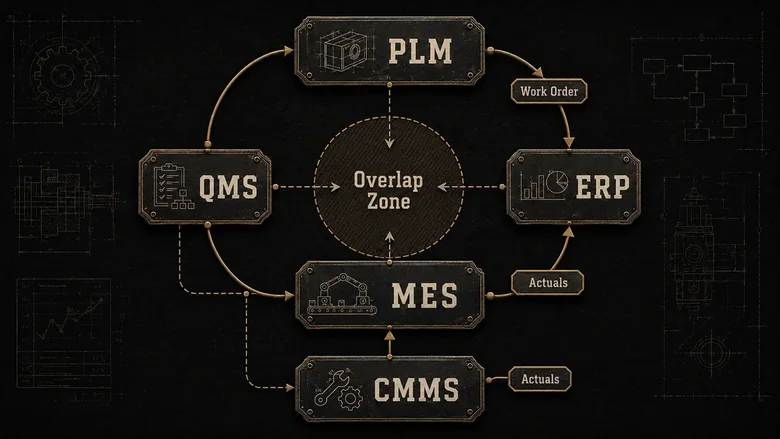
Integration in a manufacturing stack follows one direction of truth: PLM defines, ERP plans, MES executes, and the actuals flow back up so ERP and PLM reflect what really happened. In a healthy stack, PLM releases a BOM and routing to ERP; ERP creates the work order and schedule; MES runs it and streams back run time, scrap, and completions; QMS records the inspection result; and CMMS logs any downtime that hit the job.
The overlap zones are where money leaks. Inventory is the classic example: ERP tracks inventory value, MRP plans it, MES consumes it, and a warehouse system moves it, so deciding where inventory actually lives and which system is authoritative prevents four tools from disagreeing about your stock. The same tension shows up with quality (MES vs QMS vs ERP module) and scheduling (ERP vs MES vs a dedicated APS). The rule that resolves it: one system owns the record, the others subscribe to it through an integration, and nobody keys the same data twice. The Agent EyeQ schedule-control boundary is a current example: faster execution increases the cost of leaving ownership or approval ambiguous.
This is also the suite-versus-best-of-breed decision in miniature. A single-vendor suite (ERP with built-in MES, quality, and inventory) trades depth for painless integration; best-of-breed trades integration work for depth in the one layer that’s your constraint. Neither is right in the abstract. The answer is whichever keeps your bottleneck’s system of record deep and everything else “good enough.”
Every integration argument in a factory is really an argument about which system owns the truth. Decide that first, and the data flow designs itself.
When you need which layer: a decision block
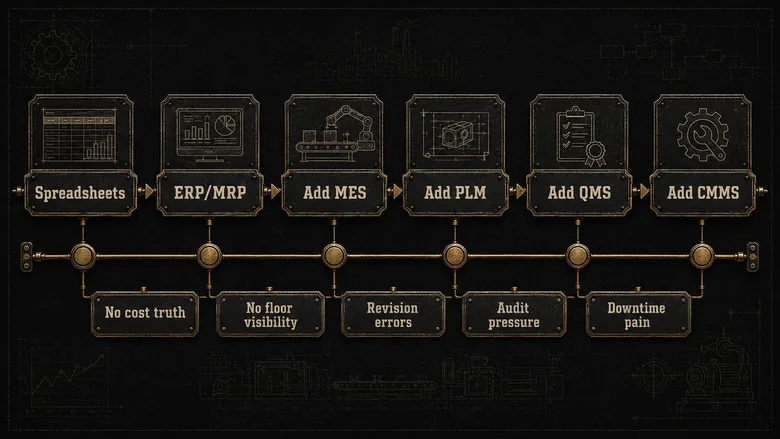
The order you buy these layers should follow your constraint, not the org chart. Almost every manufacturer starts with the business system and adds execution, definition, quality, and maintenance systems as specific pains appear. Use these triggers:
- Start with ERP (with built-in MRP) when orders, inventory, and costs live in spreadsheets and month-end is guesswork. This is the first system of record almost everyone needs.
- Add MES when you can’t see real-time production status, can’t calculate true OEE, or can’t trace a lot for a recall or audit without a manual hunt.
- Add PLM when engineering changes, revisions, and BOM errors start causing scrap, rework, or building the wrong version.
- Add a QMS when a standard or a customer audit demands controlled documents, CAPA, and evidence your ERP module can’t defend.
- Add a CMMS when unplanned downtime and reactive, firefighting maintenance become the constraint on throughput.
Two cautions close this out. First, don’t buy two systems for the same job; if the pain is a specific number, buy the one layer that owns it and integrate the rest. Second, match the buy to the real bottleneck: if your constraint is turning RFQs into fast, accurate quotes rather than running the floor, that’s a dedicated quoting-software problem, not an ERP or MES one. The stack rewards precision, and the most expensive purchases are the ones made to fix a problem that lived one layer away.
Frequently Asked Questions
ERP plans and accounts for the business: orders, purchasing, costs, and inventory value. MES runs and records the actual production those plans trigger, in real time on the floor. ERP says a job should take four hours; MES says it took five, on which machine, and why. Most mid-size manufacturers run both.
MRP is a planning calculation: it explodes the bill of materials against demand to decide what to make or buy and when. MES is execution: it dispatches and records the work once the plan exists. Put simply, MRP decides the schedule, and MES proves what actually happened against it on the shop floor.
Most manufacturing ERP suites include a light MES or shop-floor module, but it rarely matches a dedicated MES on real-time machine data, OEE, and lot genealogy. Regulated or high-mix plants usually add a standalone MES and integrate it to ERP rather than relying on the built-in module for critical traceability.
An operator scans a work order at a CNC cell; the MES dispatches the job, pulls the current CAD revision and routing, records run time and scrap, flags an out-of-spec measurement for quality, and posts the finished quantity back to ERP. Siemens Opcenter, Plex, and Tulip are widely used MES examples.
MES and OEE are linked but not the same. OEE (overall equipment effectiveness) is a single metric, availability times performance times quality, that scores how well a machine runs. MES is the system that captures the live machine data, downtime reasons, and counts needed to calculate OEE accurately, which is why OEE is one of the Core Four MES outputs.
