
Most manufacturers who get the MRP vs ERP decision wrong did not buy a bad product. They bought the right product at the wrong stage: a full ERP suite for a ten-person job shop, or a bare-bones material planner for a business already running three sites off one general ledger. The acronyms describe what the software does, not what your factory needs this year.
The honest answer to mrp vs erp is that the two are not really competitors. They are two points on the same road. MRP came first and still does one job extremely well. ERP wraps that job inside everything else a growing company has to coordinate. Which one fits depends less on a feature list and more on how complex your operation has become, and how much of the business still lives in spreadsheets.
This guide maps both systems, plus MES, the shop-floor layer buyers keep asking about, to the stage your business is actually at. You get a plain definition of each, a comparison table you can lift straight into a buying discussion, a stage-by-stage decision table, and a six-signal test for knowing when you have outgrown standalone MRP.
Direct answer — What is the difference between MRP and ERP?
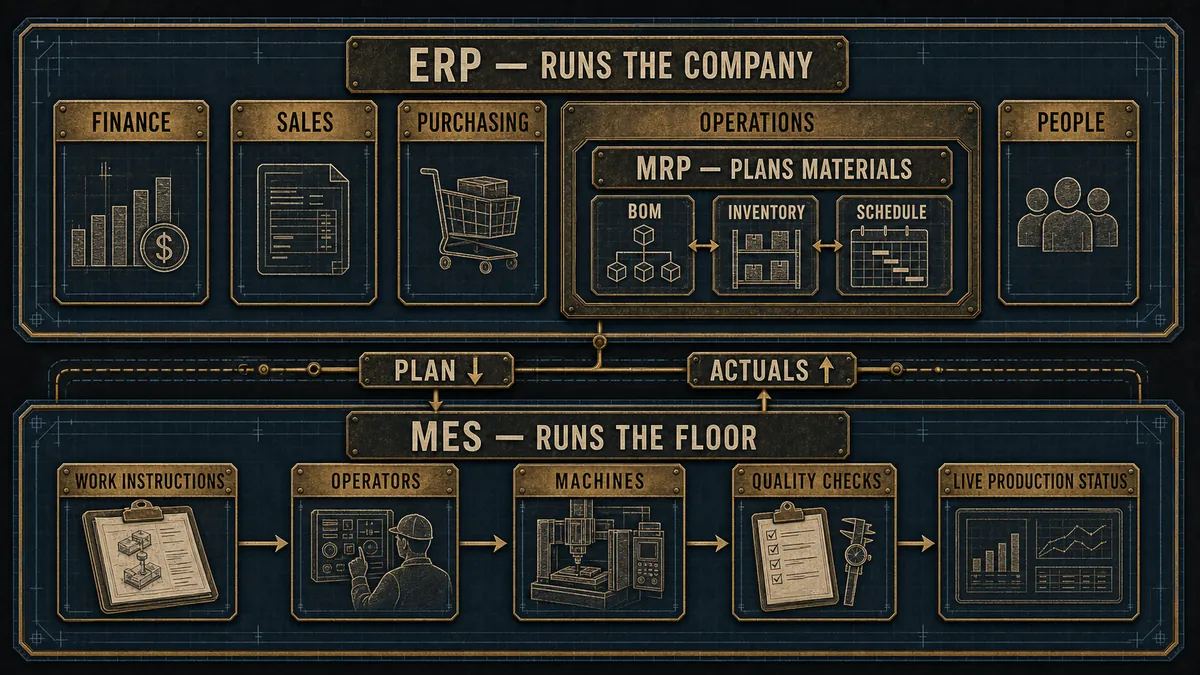
MRP (Material Requirements Planning) is software that plans what a factory needs to make. It works from the bill of materials, current inventory, and the production schedule to tell you what to buy and build, and when. ERP (Enterprise Resource Planning) is broader software that runs the whole business, including finance, sales, purchasing, and HR, on one shared database, usually with MRP built in as a module. Put plainly: MRP plans the factory, and ERP runs the company. MES is a third system that executes and tracks production on the shop floor in real time.
Key Takeaways
- MRP plans materials and production; ERP runs the whole business on one database. The question is rarely which is “better,” but which fits your stage of growth.
- MES is a separate third layer that executes and records what happens on the shop floor in real time. It complements MRP or ERP rather than replacing either.
- Most modern ERP platforms include MRP as a module, so “MRP vs ERP” is usually really “standalone MRP now versus ERP-with-MRP later.”
- Growth, not size alone, is the trigger. Software Path’s ERP Report finds that supporting company growth is the single most common reason firms adopt ERP, especially those under 500 employees.
- Run the six-signal graduation test before you buy. If three or more signals are true, you have outgrown standalone MRP.
What is MRP, and what does it actually do?
MRP, or Material Requirements Planning, is software that calculates what a manufacturer needs to buy and build, and when. It takes your bill of materials, your current inventory, and your production schedule, then works backward to generate purchase orders and work orders so the right parts arrive in time to hit the build. Its whole job is to stop two expensive failures: running out of a part mid-production, and tying up cash in stock you do not need yet. The 2026 warehouse network redesign signal from WSI shows how quickly those material-planning errors become warehouse and 3PL problems. MRP is only as accurate as the forecast it plans against, and that forecast is increasingly an AI job that sharpens demand signals before the plan is built, one of the clearest places machine learning already earns its keep on the floor. The 2026 warehouse network redesign signal from WSI shows how quickly those material-planning errors become warehouse and 3PL problems.
The idea is older than most software categories. Joseph Orlicky, an IBM engineer, set out the principles of MRP in 1964, and his 1975 book became the blueprint that nearly every early system was coded against, with more than 8,000 companies running MRP by 1981, according to QAD’s history of Orlicky’s work. That lineage matters because MRP was designed around one question, materials, and it still answers that question better than a general business tool does.
A standalone MRP system typically covers the bill of materials, the master production schedule, inventory levels, work-order release, purchasing, and basic capacity checks. Many tools sold today are technically MRP II (Manufacturing Resource Planning), which adds rough machine and labor scheduling on top. For an owner shopping for mrp software, the practical test is simple: if the tool plans materials and production but leaves your accounting, quoting, and payroll somewhere else, it is an MRP system, whatever the marketing calls it. That overlap is also why buyers conflate MRP with inventory tools; whether stock belongs in the MRP tool or a standalone app comes down to how much production planning you actually run.
What is ERP, and how is it more than MRP?
ERP, or Enterprise Resource Planning, is software that runs an entire company on one shared database: finance, sales, procurement, inventory, production, and often HR and CRM. It grew directly out of MRP by wrapping the same material-planning logic inside the accounting and order-management systems the rest of the business depends on. The defining feature is not any single module. It is that every department reads and writes to the same set of numbers.
That single source of truth is what you are really buying. When a sales order, a stock level, a purchase commitment, and a financial ledger all update from the same transaction, nobody re-keys data between systems and nobody argues about whose spreadsheet is current. The trade is cost and complexity: more to license, more to configure, and more of your team’s time to implement. Manufacturing-focused ERP platforms such as SAP, Oracle NetSuite, Epicor, and Acumatica all ship with strong MRP modules, which is why the question is rarely whether you get MRP, but how much else you are paying to surround it with. Quoting is one of those surrounding modules, and whether the ERP’s own estimator is enough or you should run a purpose-built quoting tool alongside it is worth settling before you assume the suite has it covered.
This also answers two questions buyers ask constantly. Is SAP an MRP or an ERP system? It is an ERP, with MRP inside it. Is Oracle an MRP or an ERP system? The same: Oracle sells ERP suites that contain material planning as one module among many. The big names in this space are ERP vendors, and their MRP capability is a component of a larger whole.
MRP vs ERP: the core difference in one table
The core difference is scope. MRP plans the factory, while ERP coordinates the whole company. Everything else, who uses it, what it costs, and how long it takes to roll out, follows from that one distinction. The table below is the version to bring into a buying discussion.
| System | What it is | Use it when | Watch out when |
|---|---|---|---|
| MRP | Plans materials and production from the bill of materials, inventory, and schedule | Your main pain is buying the right parts and scheduling the build, and finance is handled elsewhere | Sales, accounting, and inventory keep drifting out of sync because they live in separate tools |
| ERP | Runs the whole business (finance, sales, purchasing, HR, and production) on one database, with MRP as a module | Multiple departments need to work from the same numbers, not just the production team | You would be paying for, and configuring, modules nobody on your team is staffed to use yet |
| MES | Executes and records production on the shop floor in real time | You need live machine, labor, and work-order data, or documented traceability for compliance | Your planning layer (MRP or ERP) is not solid yet, so there is nothing reliable to execute against |
Where MES fits, and why it is not MRP or ERP
MES, or Manufacturing Execution System, is software that runs and records production on the shop floor in real time, tracking work orders, machine status, labor, and quality as the job actually happens. Where MRP and ERP plan and account for production, MES is the layer that tracks and documents the transformation of raw materials into finished goods on the floor itself. Rockwell’s 2026 MES edge execution layer is a useful example of how vendors are now trying to keep that layer local enough to run during connectivity loss.
The reason buyers keep searching for ERP vs MRP vs MES is that the three answer different questions and are easy to confuse. MRP asks what should we make and buy. ERP asks how does the whole business account for it. MES asks what is happening on the floor right now. A shop does not choose one of the three so much as add layers as its needs grow, and MES usually arrives last, once planning is reliable and real-time visibility or compliance traceability becomes the bottleneck. Quality compliance is its own layer again: when an auditor rather than the shop floor is the constraint, a dedicated QMS matched to ISO 9001, ISO 13485, or IATF 16949 sits alongside these systems rather than inside any one of them. Maintenance is a layer of its own on the same logic: once uptime rather than planning is the bottleneck, a computerized maintenance management system (CMMS) schedules the work orders and parts that keep the assets running.
MRP vs ERP vs MES by stage of growth
The most useful way to read mrp vs erp is not feature by feature but stage by stage, because the same shop needs different systems as its production and its org chart get more complex. The table below maps four common stages to what each one usually needs, and the signal that tends to push a business to the next row.
| Stage | Production complexity | What it usually needs | MRP | ERP | MES | Trigger to level up |
|---|---|---|---|---|---|---|
| Job shop / startup (under ~$5M, <20 staff) | Low mix, make-to-order, spreadsheets starting to crack | Spreadsheets plus a light MRP tool | Core | Optional | No | Stockouts and missed material buys; quoting from memory |
| Growing SMB (~$5M–$20M) | Repeat orders, several product lines, a real purchasing function | MRP now, planning the move to ERP | Core | Add finance and sales modules | Rarely | Finance re-keys production data; manual reconciling between tools |
| Established mid-market (~$20M–$100M) | Multiple lines, some make-to-stock, multi-department reporting | ERP with MRP inside it | Inside ERP | Core | Consider | Audit and traceability demands; leadership wants one set of numbers |
| Multi-site / regulated (complex or high-volume) | High mix or high volume, compliance, more than one location | ERP plus MES on the floor | Inside ERP | Core | Core | No real-time shop-floor visibility; compliance traceability gaps |
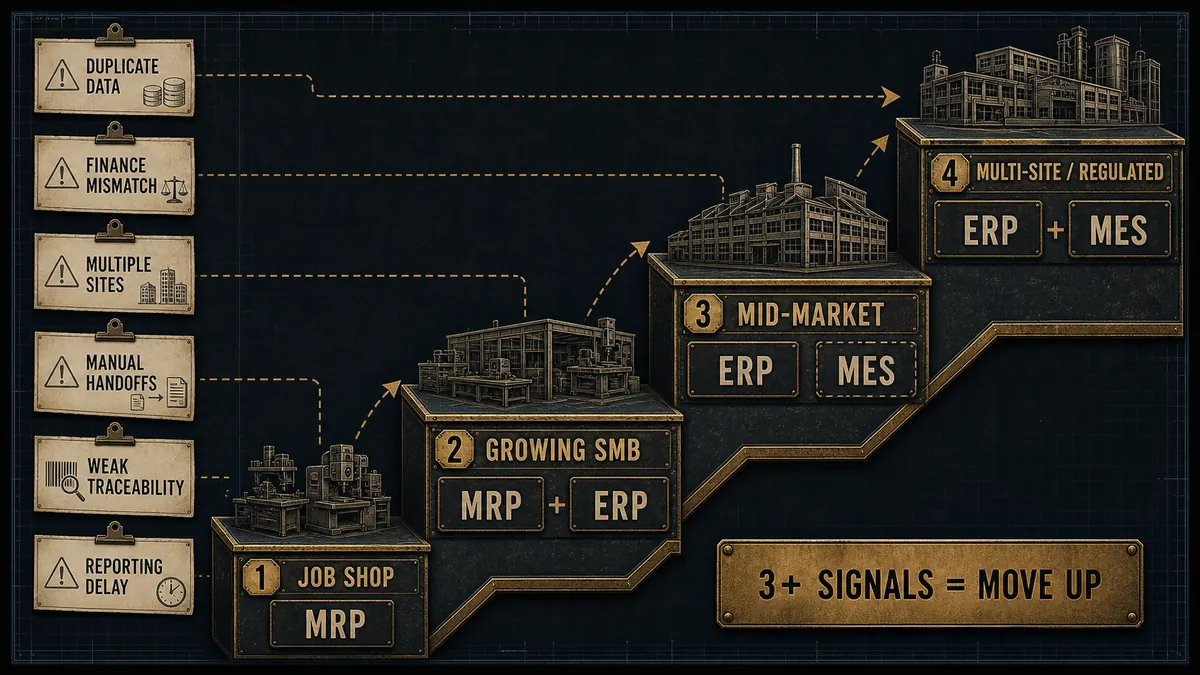
Read the table as a ladder, not a menu. Very few manufacturers jump from a spreadsheet straight to a multi-site ERP-plus-MES deployment, and the ones who try usually buy more than they can implement. The right move is to match the system to the row you are actually standing on, and to watch for the trigger that means you have started to climb. Scheduling climbs the same ladder: a spreadsheet holds early, the module inside your MRP or ERP covers the middle, and a finite-capacity scheduling tool earns its place only when overloaded machines become the constraint you keep hitting.
When to graduate from MRP to ERP: a six-signal test
You have outgrown standalone MRP when the cost of disconnected systems starts to exceed the cost of one integrated system. The clearest way to know is to count signals rather than revenue, because two shops at the same turnover can sit a full stage apart. That same jump from disconnected tools to one connected system is also the first practical step into Industry 4.0 on the plant floor, long before anyone needs a digital twin. We call this the MRP-to-ERP graduation test. Score your own operation against these six signals:
- Your finance team re-keys production data into accounting. Someone is typing the same numbers twice, and the second copy is already wrong by the time it is entered.
- You reconcile inventory across two or more systems. Stock in the MRP tool and stock in the books no longer agree without a manual merge.
- Quotes, orders, and CRM do not touch production. Sales promises dates the floor never sees, and the floor builds things sales cannot find. A configurator that generates the BOM and routing at quote time closes part of that gap before the order even lands.
- You have added a second location or legal entity. Consolidating across sites by spreadsheet is the classic moment standalone MRP runs out of room.
- Customers or auditors demand end-to-end traceability. You need to prove what went into a part, across the whole order, not just on the shop floor.
- Leadership cannot get one set of numbers without a spreadsheet merge. Every board pack starts with someone stitching exports together by hand.
If one or two of these are true, fix the process before you buy software. If three or more are true, you have crossed into ERP territory, and the disconnected systems are now costing you more in labor and errors than an integrated platform would. This matches what buyers report: supporting company growth is the single most common reason organizations adopt ERP, and it is most common among companies with fewer than 500 employees, according to Software Path’s ERP Report. The June 2026 ISM forecast adds pressure to that timing decision, with manufacturers expecting growth while hiring remains modest.
IMPORTANT
Graduating too early is as costly as graduating too late. An ERP bought a stage before you need it sits half-configured while you pay for modules nobody staffs. Count the signals honestly before you sign, not the revenue you hope to hit.
Do you need both? How to choose without overbuying
For most manufacturers the real choice is not MRP or ERP, but when to move from standalone MRP to an ERP that has MRP inside it. Because modern manufacturing ERP software ships with a material-planning module, “do you need both” usually answers itself: you keep MRP, you just run it as one part of a larger system once the business is ready to coordinate the rest. The decision is timing, not either/or. That timing question also sits inside a bigger picture, because MRP and ERP are only two layers of the six-system stack that also includes MES, PLM, QMS, and CMMS, and knowing which layer owns which job keeps you from buying the same feature twice.
When you do shortlist software, choose by your production model first and your wish list second. A clean way to run it:
- Map your production model. Make-to-order, make-to-stock, mixed, or project-based all change which system fits, and which vendors are credible.
- List the modules you will actually staff. A module nobody owns is a cost, not a capability. Buy for the team you have, plus one stage of headroom.
- Set a realistic budget and timeline. ERP selection alone takes most companies months, not weeks, and cloud is now the default deployment that buyers evaluate first.
- Weigh implementation effort, not just price. The sticker is the small number. The configuration, data migration, and training are where ERP projects succeed or stall.
The most expensive ERP is the one you buy a stage too early and then run at a third of its capacity.
This piece is the map, not the shortlist. When you are ready to compare named systems, a buyer guide built around your production model will take you further than a generic feature grid, and so will an honest look at what manufacturing software actually costs once implementation is included. Both are the natural next steps once the graduation test tells you it is time to move.
Frequently Asked Questions
MRP plans materials and production: it uses the bill of materials, inventory, and schedule to decide what to buy and build, and when. ERP is broader software that runs the whole business, including finance, sales, purchasing, and HR, on one shared database, with MRP built in as a module. In short, MRP plans the factory and ERP runs the company.
SAP is an ERP system that includes MRP as a module. Its platforms run finance, sales, procurement, and HR alongside material planning, so the MRP capability is one component of a much larger suite. The same is true of Oracle: the major names buyers ask about are ERP vendors whose products contain material planning, not standalone MRP tools.
Yes. In nearly every modern ERP platform, MRP is a module inside the larger system. ERP grew out of MRP by wrapping the same material-planning logic in accounting, sales, and supply-chain functions. You can still buy standalone MRP, but choosing ERP does not mean giving up MRP. It means getting MRP plus everything else on one database.
Move when disconnected systems cost more than an integrated one. Practical signals include finance re-keying production data, inventory reconciled across two systems, CRM and quotes that do not touch the floor, a second location, or auditors demanding traceability. If three or more of those are true, you have outgrown standalone MRP and ERP is the next step.
MES is the shop-floor execution layer. MRP and ERP plan and account for production; MES tracks and documents what actually happens on the floor in real time, including machine status, labor, and quality. It complements MRP or ERP rather than replacing either, and it usually arrives last, once planning is reliable and real-time visibility or compliance traceability becomes the priority.
If you want a clear read on whether your systems, or your website and quoting path, are quietly costing you orders, request a free manufacturer website investigation and we will show you where buyers are dropping off and what to fix first.
