
You can tell how a shop really schedules by what happens when a machine drops at 10 a.m. In most factories, someone opens a spreadsheet, starts dragging rows, and quietly re-promises three customers before lunch. It works, until the day it doesn’t. As of early 2026, roughly a quarter of manufacturers still run production planning on spreadsheets or manual methods, according to Capterra’s buyer-interaction data.
Production scheduling software promises to end that scramble. But the decision most shops actually face isn’t “which scheduling tool is best.” It’s whether you need to buy a dedicated scheduler at all, or just switch on the one already sitting inside your ERP or MES. Get that call right and you save five figures. Get it wrong and you either overbuy a heavyweight APS you can’t feed, or keep bleeding margin in a spreadsheet that was never going to hold.
This guide walks the whole decision: what production scheduling is, what the software does, the finite-versus-infinite capacity split that decides everything, how it fits with ERP and MES, and eight named tools with real prices where the vendors publish them.
Direct answer — What is production scheduling software?
Production scheduling software, often sold as Advanced Planning and Scheduling (APS), sequences work orders across machines and people against real constraints: capacity, materials, changeovers, and due dates. It turns a build plan into a shop-floor schedule, then reschedules when a machine goes down or a rush order lands. Unlike the infinite-capacity scheduling inside most MRP and entry ERP, finite-capacity APS refuses to load a resource past what it can actually run.
Key Takeaways
- Production scheduling turns a plan of what to build into a sequence of which resource runs what, and when. Software automates that sequencing against real constraints.
- The one decision that matters: finite vs infinite capacity. Infinite scheduling (most MRP and basic ERP) will plan 30 hours onto a 16-hour machine. Finite scheduling (dedicated APS) won’t.
- Most small manufacturers don’t need a standalone APS. They need to switch on the scheduling module in the ERP or MES they already own, or level a spreadsheet with better discipline.
- Buy a dedicated APS when scheduling is genuinely complex: many resources, sequence-dependent setups, frequent reschedules, and a real bottleneck you keep overloading.
- Pricing splits by tier: SMB tools publish real numbers (MRPeasy from $49/user/mo, Just Plan It from $145/mo per plant, both as of Q3 2026). Most mid-market and enterprise APS is quote-only.
Methodology
How this comparison was built
- Scope
- Public production-scheduling and APS products aimed at SMB-to-mid-market manufacturers. We reviewed 12 tools as public products; the 8 with the clearest category role are shown in the comparison table.
- Sources reviewed
- Vendor product and pricing pages (MRPeasy, Katana, Just Plan It, MaxScheduler, PlanetTogether, Siemens Opcenter APS, DELMIAWorks, Fishbowl); Capterra buyer-interaction data; Gartner market listings for detailed manufacturing scheduling.
- Date range
- Product facts and pricing checked July 2026 (Q3 2026). Prices marked “as of Q3 2026” and re-verified against each vendor’s own page where reachable.
- Tools used
- Public documentation plus a fixed attribute rubric: capacity model (finite/infinite), ERP/MES integration, deployment, manufacturing mode fit, and pricing transparency. Tools are compared on attributes, not ranked 1–5.
- Limitations
- This is a desk review of public materials, not hands-on implementation. We did not run the tools against a live shop-floor dataset. Quote-only vendors publish no pricing, so those figures are absent by design.
- Editorial independence
- No vendor named here paid for placement, ranking, or coverage.
- Conflicts of interest
- Factory Investigator sells manufacturer website and growth services; none of the software vendors named were clients at review time.
What Is Production Scheduling?
Production scheduling is the tactical process of assigning manufacturing tasks to specific resources, sequencing operations, and setting start and finish times so orders ship on time. It’s the layer between “we plan to build 400 units this month” and “machine 3 runs job 1187 at 8:15, then changes over to job 1190 at 11:40.”
Planning sets the target. Scheduling makes it real against the constraints of a specific week: which machines are free, who’s on shift, what material has landed, and which orders are already late. A good schedule is executable on the floor without a supervisor quietly rewriting it by 9 a.m.
Scheduling vs planning vs MRP
These three get blended together, and the confusion is expensive. Planning answers what and how much to build. MRP explodes that into which materials to buy and when. Scheduling answers which resource runs the work and in what order. It’s the same boundary that separates MRP-style material planning from full ERP, and blurring it is exactly why shops shortlist the wrong software.
Why scheduling is genuinely hard
Scheduling is a constraint problem, not a calendar problem. Every job competes for the same finite machines and people. Changeovers depend on sequence: running a light color before a dark one saves a wash, the reverse costs an hour. Due dates fight each other, material arrives late, and a rush order at noon invalidates the plan you built at dawn. Do this by hand across 20 work centers and you’re not scheduling, you’re firefighting. Sequencing hides some of that changeover cost, but cutting the changeover itself is exactly the bounded, floor-level problem a kaizen event is built to solve, turning a long setup into a shorter standard one.
The cost of getting it wrong
Bad scheduling shows up as late shipments, bloated work-in-process, and a bottleneck that’s somehow both overloaded and starved. Planners in complex shops can lose hours a day just rebuilding and redistributing the schedule by hand. That’s a chunk of a salary spent maintaining a document, before a single part gets made faster. Before you reschedule around that bottleneck, it pays to map the whole value stream and confirm the constraint is even real, since a schedule tuned to the wrong step just moves the pile of work-in-process somewhere new.
What Production Scheduling Software (APS) Does
Production scheduling software sequences jobs across machines and people against real capacity, material, and due-date constraints, then reschedules automatically when conditions change. The category name most vendors use is Advanced Planning and Scheduling (APS). Some sell it as manufacturing production scheduling software or production planning and scheduling software; under the label it’s the same job.
At its core, the software does four things a spreadsheet can’t do well: it holds every constraint at once, it sequences to minimize changeovers and lateness, it runs what-if scenarios in seconds, and it reschedules the whole plan the instant a machine drops or an order jumps the queue. The output is a Gantt view the floor can actually follow.
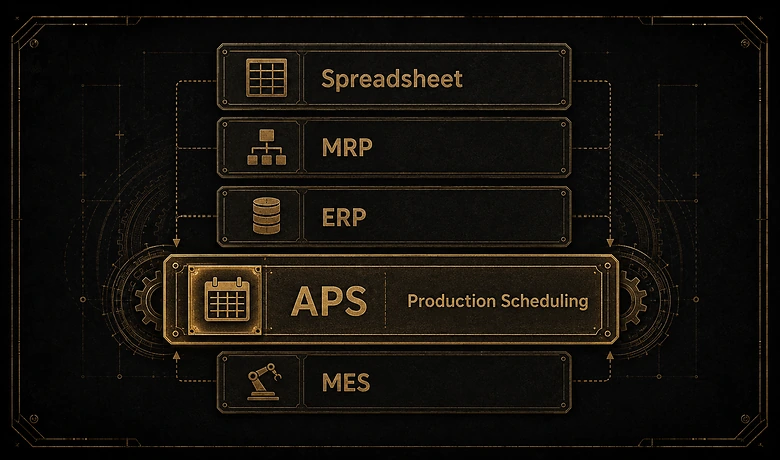
Spreadsheet vs ERP/MES module vs dedicated APS
Before any vendor names, get the three homes for scheduling straight. This is the map the rest of the guide fills in.
| Approach | What it is | Best when | Capacity model | Where it breaks |
|---|---|---|---|---|
| Spreadsheet | A manual grid one planner maintains by hand | Few work centers, stable demand, one scheduler | Infinite (you decide) | Every edit ripples; rush orders and changeovers overwhelm it |
| ERP / MES module | Scheduling built into the system you already run | You own the ERP/MES and need “good enough” sequencing | Usually infinite / lead-time based | No true finite capacity, weak on sequence-dependent setups |
| Dedicated APS | A standalone finite-capacity engine that syncs with ERP/MES | Complex, constraint-heavy scheduling and frequent reschedules | Finite (models real limits) | Overkill in cost and effort when scheduling is actually simple |
Where the software earns its money
The payback isn’t a prettier chart. It’s the planner-hours a day that stop going into schedule maintenance, plus the late orders that don’t happen because the plan was feasible on day one. That’s the shape of the win: not magic throughput, but a schedule that holds and a planner freed to solve real problems instead of rebuilding a grid.
Finite vs Infinite Capacity Scheduling
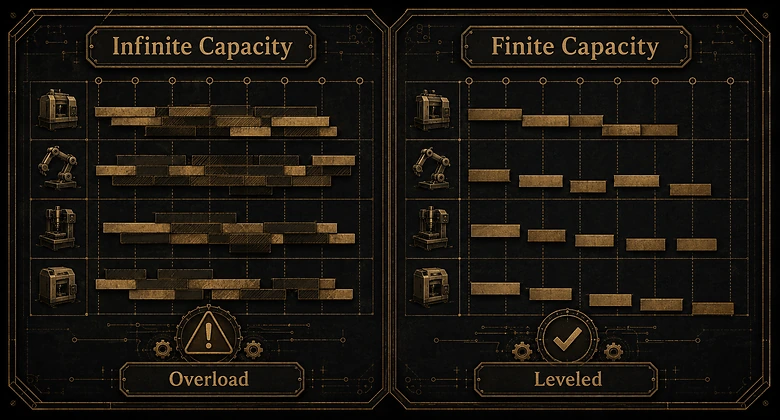
Finite capacity scheduling plans jobs within the real limits of machines and labor; infinite capacity scheduling assumes unlimited resources and ignores overloads. This single distinction decides whether a tool can actually hold a schedule, and almost every buyer skips it.
IMPORTANT
Most “scheduling” inside MRP and entry-level ERP is infinite-capacity. It will happily plan 30 hours of work onto a machine that runs 16 hours that week. If your promised dates keep slipping and nobody can say why, this is usually the reason.
How finite scheduling models the bottleneck
Finite scheduling knows each resource has a ceiling. It loads work up to that ceiling, then pushes the overflow to the next available slot or resource, so the plan reflects what the floor can truly run. It also respects sequence-dependent setups and tooling, which is where the hours actually hide. Good schedulers pace the whole plant to its busiest machine, the core idea behind drum-buffer-rope and the Theory of Constraints. The number a finite scheduler protects you from is load above 100%:
Capacity Load % = Scheduled Hours ÷ Available Hours × 100
Push a work center past 100% and an infinite scheduler shrugs; a finite one levels the load or flags the conflict. That’s the whole game.
When infinite scheduling is good enough
Infinite capacity isn’t wrong, it’s just optimistic. If you run long, stable jobs with plenty of slack and no single choke point, MRP-style infinite scheduling gets you a workable plan and you spend nothing extra. Forward scheduling (start now, see when it finishes) and backward scheduling (start from the due date, work back) both live comfortably in that world. You only need finite capacity when the plan keeps promising more than the floor can deliver.
Master Production Scheduling and Where It Sits
Master production scheduling (MPS) sets the medium-term plan of what to build and when, bridging the demand forecast and the detailed shop-floor schedule. Think of it as the layer above the daily sequence: a rolling, week-by-week statement of what the plant commits to produce.
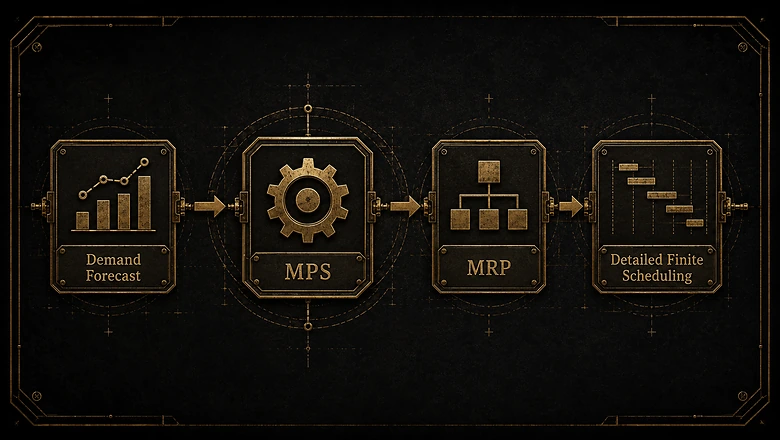
MPS vs detailed scheduling vs MRP
MPS says “build 400 of SKU A and 250 of SKU B in week 32.” MRP reads that and orders the materials to make it happen. Detailed finite scheduling then decides that SKU A runs on line 2 Tuesday morning after the changeover. Three layers, three questions, and the reason the difference between MRP and ERP keeps surfacing in scheduling debates: MPS and MRP often live in the ERP, while the detailed finite sequence may need a separate engine.
Where MPS actually lives
In most shops, MPS sits inside the ERP or MRP system as a planning screen. That’s fine, because master scheduling is a rough-cut, capacity-aware plan, not a minute-by-minute one. The detailed schedule is where infinite-capacity ERP modules run out of road, and where a dedicated APS earns its keep. Keep the two separate in your head: you can love your ERP’s MPS and still need finite scheduling underneath it.
The Production Scheduling Process in 5 Steps
The production scheduling process converts orders into an executable shop-floor plan through five steps: planning, routing, scheduling, dispatching, and monitoring. Software can automate all five, but the logic is the same whether you run it in a tool or on paper.
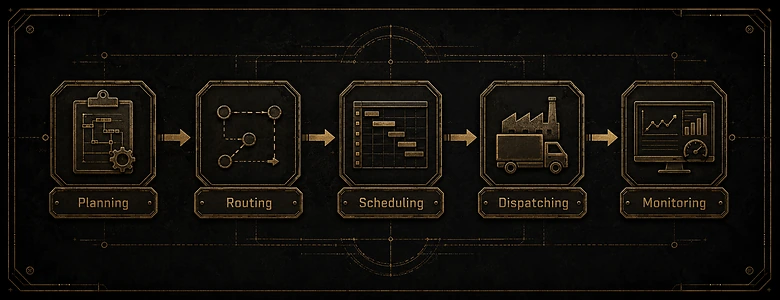
- Plan. Confirm what’s due and in what quantity, pulling from the MPS and open orders. This is where demand meets commitment.
- Route. Map each order to its operations and work centers: the sequence of machines, tools, and labor a part passes through.
- Schedule. Sequence the routed work against finite capacity, respecting setups, material availability, and due dates. This is the step software transforms.
- Dispatch. Release the sequence to the floor as operator-ready work lists and live status.
- Monitor. Track actuals against plan and reschedule when reality diverges, which it always does.
A schedule is only as good as the material behind it: promise a job Tuesday when the steel lands Thursday and the finite plan is fiction. That’s why step three reads live stock from your inventory system rather than trusting a static list. And once the sequence is set, it has to reach operators as dispatch lists and real-time status, which is the job of a manufacturing execution system, not the scheduler itself.
One caution on step five: don’t confuse production scheduling with maintenance scheduling. Keeping machines available for the plan is the job of a maintenance system that tracks machine health and PM windows, and a schedule that ignores planned downtime is one that breaks on contact with the floor. That upkeep runs on its own track, in a maintenance schedule set around production, not inside it, so the two plans inform each other instead of colliding.
Dedicated APS vs ERP/MES Module vs Spreadsheet: When to Use Which
Dedicated APS suits complex, constraint-heavy scheduling; an ERP or MES scheduling module fits simpler needs; spreadsheets work only for small, stable job counts. The honest starting position is that most manufacturers are already paying for scheduling they haven’t switched on.
The question is almost never “which scheduling tool is best.” It’s “do I need to buy scheduling at all, or turn on what I already own?”
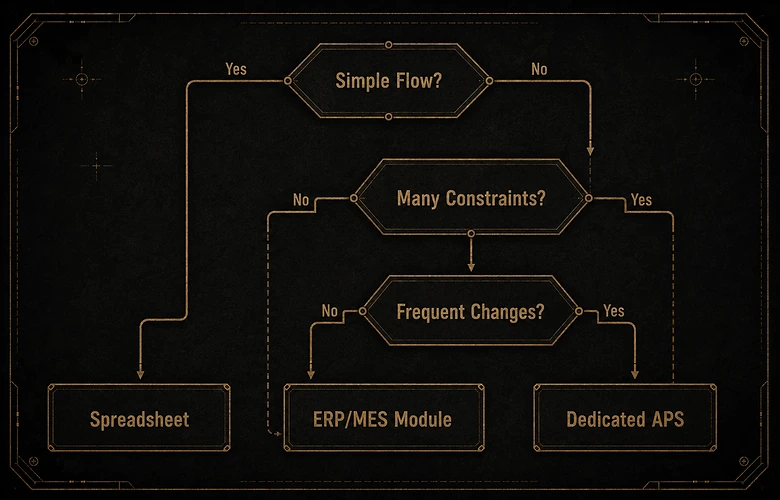
Use a spreadsheet when…
You run a handful of work centers, demand is stable, one person owns the schedule, and a bad week costs you an apology, not a customer. Below roughly a dozen active jobs, a disciplined spreadsheet is faster than any implementation. Be honest about the ceiling: the moment edits start rippling and rush orders arrive weekly, the spreadsheet is costing more than it saves.
Use the ERP or MES module you already own when…
Your scheduling is real but not exotic, and you already run the system of record. Before you shortlist anything, check whether the ERP you already run can level a bottleneck week; many can, at “good enough” quality. The MES scheduler is the right home when your priority is dispatch and shop-floor execution rather than deep optimization. Buying a second tool to do what your first tool already does is the most common overbuy in this category.
Use a dedicated APS when…
Scheduling is genuinely hard: many resources, sequence-dependent setups, tight due dates, a bottleneck you keep overloading, and reschedules several times a day. A dedicated APS doesn’t replace your ERP or MES; it plugs into them, pulls the orders and capacity already there, and runs the finite optimization those systems never did well. The signal you’ve outgrown a module is simple: your planner spends more time fighting the schedule than improving it.
Production Scheduling Software Compared
Production scheduling tools range from dedicated APS systems to modules inside MRP and ERP platforms, priced from tens of dollars per user to enterprise quotes. The table splits them by that exact axis, because it’s the axis your decision turns on. Prices are as of Q3 2026, verified on each vendor’s page where reachable; “quote only” means the vendor publishes no public pricing.
| Tool | What it is / best for | Capacity model | Deployment | Dedicated or module | Starting price (Q3 2026) |
|---|---|---|---|---|---|
| Just Plan It | Visual finite scheduler for high-mix, low-volume job shops | Finite | Cloud | Dedicated APS | From $145/mo per plant |
| MaxScheduler | Lightweight drag-and-drop scheduling board for job shops and printers | Finite (visual) | Web / cloud | Dedicated | From $200/mo |
| PlanetTogether | Multi-plant, multi-constraint APS that integrates with major ERPs | Finite | Cloud + on-prem | Dedicated APS | Quote only |
| Siemens Opcenter APS | Constraint-based APS for complex mid-to-enterprise plants (formerly Preactor) | Finite | Desktop / on-prem | Dedicated APS | Quote only |
| MRPeasy | Cloud MRP / light-ERP with visual scheduling for small manufacturers | Finite (backward) + infinite | Cloud | Module in MRP | From $49/user/mo |
| Katana | Cloud inventory / MRP with production scheduling for makers and SMBs | Lead-time (not true finite) | Cloud | Module in MRP | Free; Core from $299/mo (+$199/mo mfg add-on) |
| DELMIAWorks | Full ERP + MES with built-in scheduling for discrete and process shops | Finite | Cloud / on-prem | Module in ERP/MES | Quote only |
| Fishbowl Manufacturing | Inventory and manufacturing with basic work-order scheduling for SMBs | Basic finite | Desktop + cloud | Module in inventory/mfg | Quote (perpetual + cloud) |
Two patterns jump out. First, transparent pricing clusters at the SMB end: the tools built for small shops publish real numbers, while nearly every mid-market and enterprise APS is quote-only. Treat that opacity as a cost signal, not a coincidence. Second, “scheduling” inside Katana or Fishbowl is lighter than the finite engine in Just Plan It or PlanetTogether, so match the depth to your actual complexity rather than the logo.
One name deliberately left off the table: Autodesk Fusion Operations (formerly Prodsmart) is a manufacturing execution system, not a scheduler, so it belongs in the MES buyer guide rather than here. Naming the boundary is the point: a lot of “scheduling” marketing is really MES or ERP wearing a scheduling hat.
How to Choose Production Scheduling Software
Choosing production scheduling software means matching capacity model, integration needs, manufacturing mode, and budget to a two- or three-vendor shortlist you can trial. Work the requirements before you work the demos, or every vendor will sound perfect.
PRO TIP
Before you shortlist a dedicated APS, open the scheduling module in the ERP or MES you already own and try to level one real bottleneck week in it. If it can, you may not need to buy anything. If it can’t, you now have a precise spec for what to go find.
Build the requirements list first
Pin down four things. Capacity model: do you genuinely need finite scheduling, or is infinite good enough? Integration: which ERP, MRP, or MES must it read live data from? Manufacturing mode: job shop, make-to-order, discrete assembly, or process, since each stresses scheduling differently. And budget reality, including the parts vendors don’t lead with.
Ask vendors the questions that expose fit
Make every shortlisted vendor answer: is your scheduling finite or infinite, and can you prove it on our data? How does it sync with our ERP, and how often? How long does a real implementation take for a shop our size? And what does the total cost look like at year one, not month one? Push hard on quote-only vendors to put a number on paper before you invest weeks in a demo cycle.
Count the total cost, not the sticker
The subscription is the smallest number in the room. Implementation, data cleanup, integration, and training routinely dwarf it, the same pattern that runs across manufacturing software budgets generally. And once it’s live, measure the schedule the way you’d measure the line: schedule adherence, on-time delivery, and the availability and performance losses that OEE exposes when the plan and the floor disagree. A scheduler that doesn’t move those numbers isn’t earning its license.
Frequently Asked Questions
A production scheduler is either the person who sequences jobs on the shop floor, or the software that does it. The human role decides what runs where and when against capacity and due dates. The software automates that sequencing, holding every constraint at once and rescheduling when conditions change.
Yes, for small, stable operations with few work centers and one scheduler. Roughly a quarter of manufacturers still plan in spreadsheets. It breaks down as jobs, changeovers, and rush orders multiply: every edit ripples, and no formula enforces finite capacity, so the plan quietly promises more than the floor can run.
Planning (confirm what’s due), routing (map orders to work centers), scheduling (sequence against finite capacity and setups), dispatching (release work to the floor), and monitoring (track actuals and reschedule). Software can automate all five, but scheduling, step three, is the one it transforms most.
Planning is medium-term and answers what and how much to build, usually as a master production schedule. Scheduling is short-term and answers which resource runs each job and in what exact order. Planning sets the target; scheduling makes it executable against this week’s real constraints.
Most ERP and MRP systems include a scheduling module, but it’s usually infinite-capacity: fine for simple, stable production. Complex shops add a finite-capacity APS that integrates with the ERP, pulls its orders and capacity data, and runs the optimization the ERP module never handled well.
