
Ask a plant manager whether they run preventive maintenance and almost everyone says yes. Ask how the team actually spends its week and the answer shifts. In MaintainX’s State of Industrial Maintenance 2026 survey of 2,234 maintenance and operations leaders across the US and Canada, 64% said they run a preventive maintenance program, yet half of all teams still spend less than 40% of their time on planned work. The rest is firefighting.
That gap is the problem preventive maintenance software is built to close. It turns “we should service that pump every 500 hours” into a scheduled, assigned, and documented job that actually happens, instead of a good intention that loses to the next breakdown. This guide covers what the software is, the types of preventive maintenance it schedules, how to build a program and a schedule that survive contact with the floor, and the honest question of when a light tool is enough versus when you need a full CMMS.
Direct answer — What is preventive maintenance software?
Preventive maintenance software is a tool that schedules, assigns, and records recurring equipment maintenance so it happens on a fixed cadence instead of after a breakdown. It triggers work orders by calendar date, runtime hours, or meter reading, tracks each asset’s service history, and manages the spare parts a job needs. In practice it is usually a CMMS, or the preventive-maintenance module inside one, rather than a separate category of product.
Key Takeaways
- Preventive maintenance software schedules recurring service by time, runtime, or meter reading, then turns each due date into a tracked work order, so routine upkeep happens before a failure rather than after.
- Most “preventive maintenance software” is really a CMMS or its PM module. The standalone app, the full CMMS, and the ERP maintenance module differ mainly in depth, not in the core scheduling job.
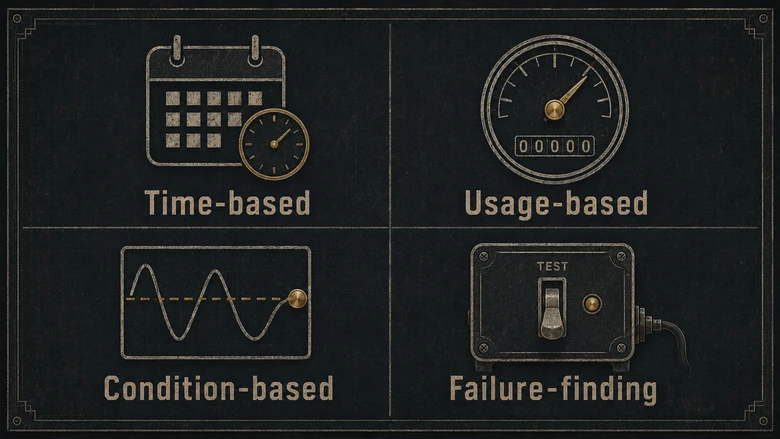
- Four working types of preventive maintenance run on a real factory floor: time-based, usage-based, condition-based, and failure-finding. Each sets a different trigger, and most plants run a blend.
- A program is more than a calendar. It needs an asset list ranked by criticality, the right PM type per machine, written task instructions, and the spare parts staged to do the work.
- A light PM app is enough for a small shop with a short asset list. Once you need parts inventory, multiple sites, and audit-grade history, you have outgrown it and want a full CMMS.
What is preventive maintenance software?
Preventive maintenance software is a digital tool that plans, schedules, and records maintenance performed on a fixed interval, so equipment gets serviced before it fails rather than after. It replaces the whiteboard, the shared calendar, and the binder of paper checklists with one system that opens work orders automatically and keeps a history of every job done on every asset.
The label covers a wide range of products, from a free mobile app up to an enterprise platform, but underneath the marketing every preventive maintenance program software does the same handful of jobs.
- Schedules recurring work. You set a trigger, such as every 90 days, every 500 running hours, or every 10,000 cycles, and the system opens the job when it comes due.
- Turns schedules into work orders. Each due task becomes an assignable job with steps, safety notes, the asset’s location, and the parts it calls for.
- Keeps an asset register. Every machine, line, and facility asset gets a record: make, model, install date, and its full service history.
- Manages spare parts. It ties parts to tasks so a technician knows what to pull, and it flags when stock runs low.
- Records what happened. Completed jobs, downtime, labor hours, and parts used all log against the asset, which is the raw material for compliance audits and reliability analysis later.
Strip those five jobs out and you are back to a spreadsheet that nobody updates. The value is not the schedule itself, it’s that the schedule generates accountable work and a record you can trust.
Preventive maintenance vs reactive: why scheduled work wins
Preventive maintenance is any service you perform on a schedule to lower the chance of failure, as opposed to reactive maintenance, where you run a machine until it breaks and then scramble to fix it. Nearly every plant inherits the reactive habit by default, because doing nothing until something stops feels free.
The bill just arrives later. The U.S. Department of Energy’s Operations & Maintenance Best Practices Guide puts the savings from a functioning preventive program at 12% to 18% over run-to-failure, with a predictive layer adding another 8% to 12% on top. Siemens’ True Cost of Downtime 2024 report pegged unplanned downtime at roughly $1.4 trillion a year across the world’s 500 largest companies, about 11% of turnover, with a single automotive line losing up to $2.3 million for every idle hour.
So the reason to schedule is not tidiness, it’s economics. Planned work is shorter, safer, and cheaper per hour than the same repair done in a panic at 2 a.m. with no parts on the shelf. A scheduled bearing swap is an hour on a Tuesday; the same bearing seizing mid-run can take out a shaft, a seal, and a shift of output. That economic advantage disappears if the bearing is bought outside approval or reaches the plant without a posted receipt, so recurring MRO demand needs a controlled requisition-to-payment path as well as a maintenance schedule.
Preventive is not the only proactive option. Condition-monitoring and predictive maintenance service a machine only when sensor data says it needs attention, which wastes fewer parts but needs sensors, a clean data baseline, and people who can read the signals. Which approach belongs on which machine is a longer story, and our guide to the trade-offs between preventive and predictive maintenance maps that out asset by asset. For most plants the pattern is the same: preventive is the backbone, and predictive gets added selectively to the critical few.
Types of preventive maintenance
Four types of preventive maintenance actually run on a factory floor, and they differ by what triggers the work. Getting the trigger right for each asset is the whole game, because a schedule matched to how a machine really wears prevents failures, while a schedule that ignores it just replaces healthy parts on a calendar.
- Time-based. Service on a fixed calendar interval, such as every quarter, whether or not the asset ran hard. Best for equipment that ages on the wall clock: HVAC, fire systems, and anything with a mandated inspection date.
- Usage-based. Trigger by a meter, such as running hours, cycles, or units produced. Best for duty-cycle machines like compressors, pumps, and presses, where wear tracks use, not the calendar.
- Condition-based. Trigger the work when an inspection or a reading crosses a set limit: a vibration level, an oil-analysis result, a temperature. Best for assets that give a measurable warning before they fail.
- Failure-finding. Scheduled tests of protective and standby gear that shows no symptoms until you test it: relief valves, alarms, e-stops, and backup pumps. The task is not to service the device, it’s to confirm it will work when called on.
A fifth idea, risk-based maintenance, is less a separate type than the lens you use to tune the others: the more a failure would cost in safety, downtime, or scrap, the tighter the interval. Most plants blend all four types, and good preventive maintenance software lets you set a different trigger per asset instead of forcing everything onto one calendar.
PM software, a CMMS, or an ERP maintenance module?
Preventive maintenance software is not really its own product category. When you shop for it, you are choosing among three things that all schedule PM work: a light standalone PM app, a full CMMS, or the maintenance module inside an ERP. They share the same core job and separate on depth.
| Option | What it is | Best for | Limits |
|---|---|---|---|
| Standalone PM app | A focused, often mobile-first tool that does PM scheduling, work orders, and basic asset records, frequently on a free or low-cost tier. | Small shops and single sites with a short asset list that want scheduled work orders running this week. | Thin on parts inventory, multi-site rollups, integrations, and audit-grade reporting. You outgrow it as complexity rises. |
| Full CMMS | A computerized maintenance management system: PM scheduling plus spare-parts inventory, meter integrations, labor tracking, and deep reporting on maintenance history. | Plants that need parts tied to work orders, multiple sites or shifts, and defensible records for ISO or customer audits. | More to configure and adopt; the license is the small part of the cost next to setup and training. |
| ERP maintenance module | The maintenance function bundled inside a broader ERP or EAM suite, sharing data with inventory, purchasing, and finance. | Shops standardizing on one system of record that want maintenance costs to flow into the same ledger as everything else. | Often shallower on frontline usability than a dedicated CMMS; strong on cost rollup, weaker on the technician’s phone. |
The practical takeaway is that “preventive maintenance software” almost always means a CMMS or its PM module, and the real question is how much depth you need. Comparing named products and prices is a separate job, and our rundown of CMMS platforms for manufacturers scores the main options by plant type and budget so you are not starting from a blank vendor list.
Don’t confuse any of this with the software that runs production itself. A manufacturing execution system executes and monitors the build; maintenance software keeps the machines that do the building available. Different jobs, different tools, and buying one while expecting the other is a common and costly mix-up on the shop floor.
How to build a preventive maintenance program
To build a preventive maintenance program, start with your assets and the consequences of their failure, not with the software. The tool schedules the work; the program decides which work is worth scheduling. Skip that thinking and you get a calendar full of low-value tasks that trains the team to ignore the alerts. The same criticality ranking should set the rules for holding maintenance spares: which parts get a buffer, which locations get cycle-counted, and which items can wait for the supplier.
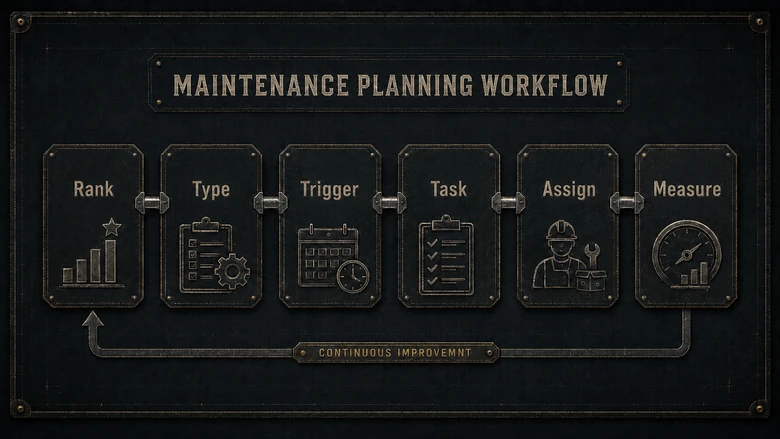
A real preventive maintenance plan answers four questions in order: which assets matter most, what should happen to each one and how often, who owns the task, and how you will know it worked. The parts on hand decide whether any of it survives Tuesday. Tie each recurring task to the spares it consumes, because a PM that stalls waiting for a belt is just downtime with paperwork, and keeping those parts visible is where maintenance and spare-parts inventory earns its place next to the schedule. For high-use belts, filters, fasteners, and other C-parts, vendor-managed bins can protect predictable maintenance consumables, provided cycle counts and consumption scans are accurate enough for the supplier to trust.
Build the PM schedule in six steps
A preventive maintenance schedule is the working output of the program: the list of what gets done, to what, on what trigger, by whom. Build it in this order.
- List and rank your assets. Pull every asset into one register, then rank each by criticality, roughly downtime cost multiplied by how likely it is to fail. The top of that list earns tight PMs; the bottom may be fine run-to-failure.
- Pick a PM type for each asset. Time-based for steady calendar wear, usage-based for duty-cycle machines, condition-based where a measurable signal exists, and failure-finding for standby safety gear.
- Set the trigger and interval. Start from the OEM manual for a defensible baseline, then adjust to your real run hours and failure history rather than leaving the factory default in place forever.
- Write the task, not just the title. Each PM needs a checklist: the steps, torque specs, lockout/tagout, the parts, and a time estimate. “Service compressor” is a wish; a ten-line checklist is a job.
- Assign it and stage the parts. Name an owner and confirm the spares are stocked before the first cycle comes due, so the schedule does not fail on its first run.
- Measure and tune. Track PM compliance, the share of scheduled jobs finished on time, and let failure data push intervals shorter or longer. A program that never changes its intervals is not being managed.
IMPORTANT
A schedule that services everything on a calendar quietly wastes money by replacing parts that still had life in them. Rank by criticality first, schedule second. Over-maintenance is a real failure mode, not a safe default.
A starter PM checklist
A good preventive maintenance checklist item is specific enough that two different technicians would do the same job. For a pump PM that might read: check seal for leaks, grease bearings to spec, verify alignment, log vibration reading, replace filter (part #), and confirm guard is secure. Notice each line is a verifiable action with a result, not a vague reminder to “inspect.” Preventive maintenance examples like that are what turn a schedule into consistent work and give the maintenance history its value at audit time.
When preventive maintenance software is enough, and when you need a CMMS
Use standalone preventive maintenance software when your needs are simple, and step up to a full CMMS when they are not. The trap is buying more system than you can adopt, then abandoning it, so match the tool to where you actually are.
A PM app, or even a disciplined spreadsheet, is usually enough when you run a single site, have a short list of critical assets, work with one or two technicians, trigger everything on calendar or runtime, and face no formal audit requirement. If that describes your shop, get scheduled work orders running first and worry about more later.
Move up to a full CMMS or EAM when you need spare-parts inventory tied to work orders, run multiple sites or shifts, must produce audit-grade maintenance history for ISO or a customer, want meter and sensor integrations, or need reporting on metrics like MTBF and PM compliance. Asset-intensive plants with long-lived, capital-heavy equipment lean toward the EAM end of that range, where maintenance ties into asset lifecycle and capital planning.
The step up is not free, though most of the cost hides where you don’t expect it. As our breakdown of what manufacturing software really costs shows, the jump from a free app to a full CMMS lands mostly in implementation and training, not the monthly license. Budget for the rollout, not just the seat price, and the move pays back through the downtime you stop buying.
Frequently Asked Questions
Preventive maintenance software schedules, assigns, and records recurring equipment maintenance so it happens on a fixed cadence instead of after a failure. It opens work orders by calendar date, runtime hours, or meter reading, keeps each asset’s service history, and manages the spare parts a job needs. Most of these tools are a CMMS or its preventive-maintenance module.
Mostly, yes. Preventive maintenance is one job a CMMS does, alongside work-order management, spare-parts inventory, and reporting. A standalone “PM app” is a lighter tool focused on scheduling, while a CMMS adds inventory, integrations, and audit-grade history. When a product is marketed as preventive maintenance software, it is usually a CMMS or the PM module inside one.
Preventive maintenance is triggered by time or usage on a fixed schedule, regardless of the machine’s condition. Predictive maintenance is triggered only when sensor data, such as vibration or temperature, shows a failure starting. Preventive is cheaper to start and easy to schedule; predictive wastes fewer parts but needs sensors, a data baseline, and skills. Most plants use preventive as the base and add predictive on critical assets.
List every asset and rank it by criticality, then pick a PM type for each one: time-based, usage-based, condition-based, or failure-finding. Set the trigger and interval from the OEM manual and adjust to your failure history, write a real checklist per task, assign an owner, stage the parts, and track PM compliance so you can tune intervals over time.
It ranges from free or low-cost tiers on standalone PM apps up to roughly $20 to $100 per technician per month for full CMMS platforms (as of 2026), with enterprise and EAM systems quoted higher. The bigger number is usually implementation, data setup, and training, not the license, so budget for the rollout rather than just the per-seat sticker price.
