
The procure to pay process starts after a usable supplier path exists. Choosing which supplier to qualify, negotiate with, and contract belongs to strategic sourcing. This page begins when an employee or planning system requests a purchase, then follows the commitment through approval, purchase order, receipt, invoice, match, payment, and accounting record.
That boundary matters on a factory floor. A pallet can be physically inside the building while accounts payable still has no receipt to match. A buyer can negotiate the right price while an outdated unit of measure makes the invoice fail. P2P is where those handoffs become one controlled transaction or one expensive queue.
Direct answer: What is the procure-to-pay process?
The procure-to-pay process is the transactional cycle a manufacturer uses after a supplier path exists: create and approve a requisition, issue a purchase order, record receipt, capture the invoice, perform a three-way match, approve exceptions, then pay and post the record. The three-way match compares the PO, goods receipt, and invoice. Source-to-pay starts earlier with supplier selection and contracting; P2P begins with the buying request.
Key Takeaways
- P2P controls the transaction after sourcing; it does not choose the supplier.
- The goods receipt is a financial control, not warehouse paperwork.
- A three-way match tests ordered price and quantity against accepted receipt and billed amount.
- AP should route a mismatch to its owner, never invent a receipt or rewrite a PO to clear the queue.
- Automate clean documents and exception routing only after roles, thresholds, tolerances, and receiving discipline are defined.
Set the Procure-to-Pay Boundaries Before Mapping the Flow
Procure to pay is the controlled transaction chain that converts approved demand into a supplier payment and an auditable accounting record. It connects the requester, budget owner, buyer, receiving, quality, accounts payable, and treasury around one purchase commitment. It does not set the sourcing strategy or process a customer’s sales order.
IBM describes P2P as a process rather than a technology and follows it from requisition through payment. That distinction is useful: an ERP can hold the records, but the company still has to decide who may request, approve, receive, match, release, and change supplier data.
| Process | Starts with | Ends with | Primary owner |
|---|---|---|---|
| Source-to-pay | Category need and supplier market | Paid, recorded supplier transaction | Procurement with finance |
| Procure-to-pay | Purchase requisition | Payment and posted record | Purchasing, receiving, and AP |
| Invoice-to-pay | Supplier invoice | Payment and remittance | Accounts payable |
| Order-to-cash | Customer order | Customer cash and AR record | Sales, fulfillment, and AR |
The mirrored language causes real confusion. The U.S. Census Bureau reported on July 27, 2026 that June new orders for manufactured durable goods were USD 334.8 billion. Those are orders manufacturers received from customers, so they enter order-to-cash. The purchase orders those manufacturers send to suppliers enter P2P. One is revenue demand; the other is a spend commitment.
Demand governance sits above both. The supply review in sales and operations planning may expose a material shortage or capacity decision, but its output is a requirement, not an approved purchase. P2P converts that requirement into an authorized order, a verified receipt, and a posted liability.
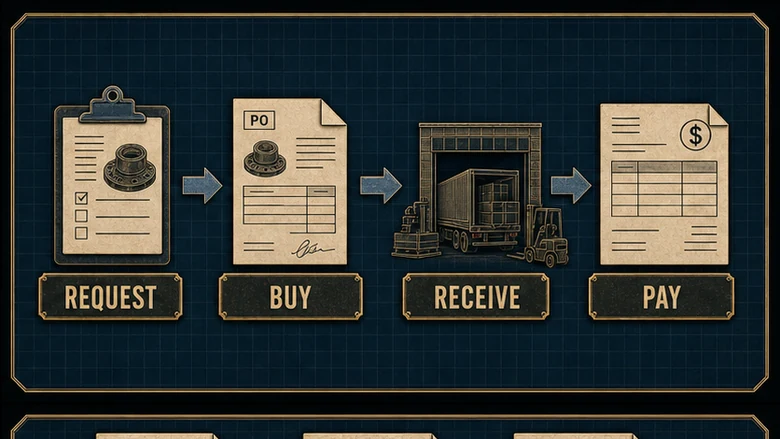
Run the Seven-Step Procure-to-Pay Process
A manufacturer can describe P2P in seven steps without hiding the work: requisition, approval, purchase order, receipt, invoice capture, three-way match and exception approval, then payment and posting. Supplier lead time and payment terms make elapsed time variable. The document sequence should not vary.
| Step | Who does it | System of record | What can go wrong |
|---|---|---|---|
| 1. Requisition | Requester or planner | ERP or purchasing workflow | Wrong item, unit, date, account, or quantity |
| 2. Approval | Budget and policy owner | Approval workflow | Self-approval, split requests, or stale budget |
| 3. Purchase order | Buyer | ERP purchasing module | Wrong price, terms, revision, unit, or ship-to |
| 4. Goods receipt | Receiving and quality | ERP, WMS, and quality record | Receipt missing, late, duplicated, or not adjusted for rejection |
| 5. Invoice capture | Supplier and AP | AP queue and ERP | Duplicate, wrong supplier, bad PO reference, or unreadable line |
| 6. Match and approve | AP, buyer, and receiver | ERP or AP automation | Price, quantity, tax, freight, or receipt variance |
| 7. Pay and post | AP and payment releaser | ERP, bank, and general ledger | Duplicate release, changed bank data, or wrong payment date |
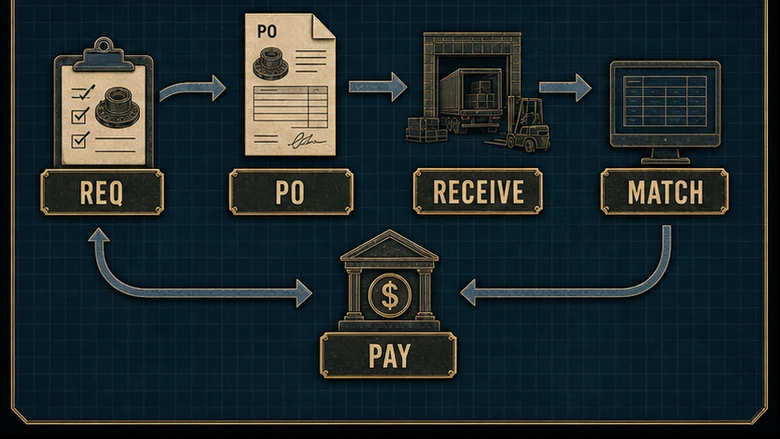
Follow one clean transaction through the cycle
How to run the seven-step P2P cycle
Allow about one hour of internal touch time for a clean transaction across roles. Delivery lead time and agreed payment terms sit outside that estimate.
Create a complete purchase requisition
Enter the item or service, quantity, unit, required date, cost object, delivery location, and business reason.
Route approval against policy and budget
Send the total commitment to the named budget owner and any risk, quality, or capital approver required by policy.
Issue the controlled purchase order
Convert the approved request into a PO with the supplier, revision, price, unit, terms, tax, freight, and ship-to confirmed.
Post the accepted goods receipt
Record what arrived, when, where, and how much was accepted or rejected before material becomes available for use.
Capture and check the supplier invoice
Validate supplier identity, invoice number, PO reference, line values, taxes, and duplicate indicators before posting.
Match and resolve each exception
Compare PO, receipt, and invoice, then route price issues to buying and receipt issues to receiving or quality.
Release payment and close the record
Approve the payment batch separately, transmit it, post the liability and cash entries, and retain the audit trail.
Steps 1 and 2: create demand, then approve the commitment
A purchase requisition is an internal request, not an order sent to a supplier. It should identify what is needed, why, when, where, how it will be charged, and which specification or revision controls the buy. A planning run may propose the requirement. The distinction between material planning and company-wide control is the same one behind the MRP versus ERP boundary: MRP can suggest what to buy, while the approval and financial commitment normally live in ERP.
Approval should test budget, authority, policy, and risk before the company commits. A manager clicking approve after the material is already on the dock is documenting a bypass, not controlling a purchase. Capital equipment, safety-critical parts, regulated materials, and unusual payment terms may need different approvers even at the same value.
Step 3: issue a purchase order the supplier can execute
The PO is the external instruction and internal commitment. Confirm supplier legal entity, part or service description, revision, quantity, unit of measure, unit price, currency, promised date, delivery location, freight, tax treatment, payment terms, and the person who may authorize a change. A decimal or unit error here follows every later document.
Use a standard PO for a defined one-time buy, a blanket or release order for repeat demand under agreed terms, and a service PO with milestones or acceptance evidence for work that has no pallet. Vendor-managed inventory can change who triggers replenishment and may use releases or consumption records instead of a new classic PO each time, but it still needs an authorized commercial basis and a receipt or consumption record.
Step 4: post the accepted receipt at the dock
A goods receipt note, often called a GRN, records what the factory accepted against the PO. Capture PO line, item, quantity, unit, location, date, lot or serial where required, and inspection status. If 100 arrive and quality rejects four, the financially relevant accepted quantity may be 96, not the carrier’s delivery quantity of 100.
The receipt is also the transaction that updates stock and makes the later match possible. That is why the receiving discipline in manufacturing inventory management reaches directly into AP. Material should not move to an available bin while the receipt waits on a desk, and AP should never create a blind receipt merely to clear an invoice.
Steps 5 through 7: capture, match, pay, and retain evidence
AP captures the invoice header and lines, validates the supplier and invoice number, checks for a valid PO, and tests for a duplicate. A clean invoice can match automatically. An exception should carry a reason, owner, age, and resolution evidence instead of bouncing through an email chain.
After match or authorized exception approval, AP schedules the invoice according to terms. A separate payment releaser reviews the batch, sensitive supplier-bank changes receive independent verification, the bank transmits the payment, and finance posts the liability and cash entries. Keep requisition, approvals, PO revisions, receipt, invoice, exception decision, and remittance connected by one transaction key.
Make the Three-Way Match a Real Control
A three-way match compares the purchase order, the accepted goods or service receipt, and the supplier invoice before payment. The PO states what the company authorized, the receipt states what it accepted, and the invoice states what the supplier wants paid. A match is meaningful only when each source was created by the role that actually knows that fact.
Microsoft’s current invoice-matching guidance separates price and quantity tests: a three-way match compares invoice unit price with PO unit price and invoice quantity with matched product-receipt quantity. It also makes tolerances configurable. That is the control model, not a promise that every difference should be ignored below one generic percentage.
| Field | Purchase order | Goods receipt | Supplier invoice | Result |
|---|---|---|---|---|
| Part and unit | Valve body, each | Valve body, each | Valve body, each | Pass |
| Quantity | 100 ordered | 96 accepted, 4 rejected | 100 billed | Fail: 4 above accepted receipt |
| Unit price | USD 12.50 | Not applicable | USD 12.75 | Fail: 2.0% price variance |
| Extended amount | USD 1,250.00 | 96 accepted | USD 1,275.00 | Hold pending two resolutions |
Assume the plant allows no overbilling above accepted quantity and a 1% price tolerance for this item. The invoice fails twice: four units were not accepted, and the invoice price is 2% above the PO. Receiving or quality owns the quantity question. The buyer owns the price or PO-change question. AP owns the hold and evidence, not either operational fact.
IMPORTANT
Never “fix” a three-way match by changing the receipt to what the invoice says. If 100 were truly accepted, receiving corrects the receipt with evidence. If only 96 were accepted, the supplier corrects the invoice or issues a credit. The audit trail should show which source was wrong and who corrected it.
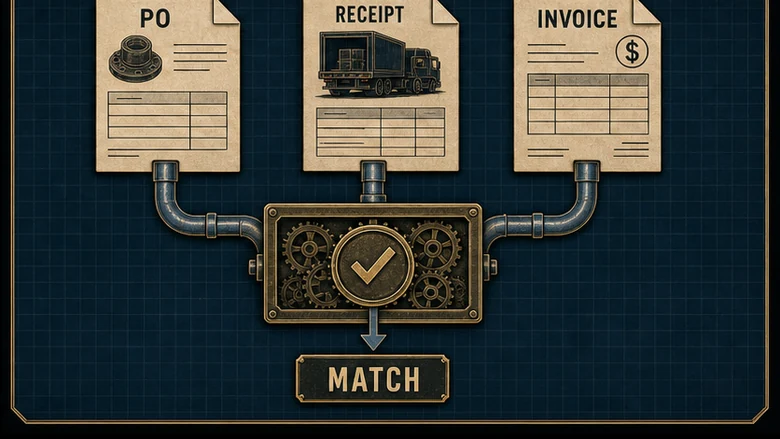
Match the fields that carry risk
At line level, compare supplier and legal entity, PO and line, part or service, revision where relevant, unit of measure, ordered and accepted quantity, unit price, currency, tax, freight, discounts, and invoice total. Services need named acceptance evidence, such as an approved milestone or time record, because no dock receipt exists.
Duplicate detection is a separate control. Normalize supplier ID and invoice number, then compare amount, date, PO, and bank data. A supplier can resend the same invoice through a portal and email with a space, dash, or leading zero changed. Flag it for review; do not assume every near-match is fraud or every exact number is safe.
Set tolerances by item, supplier, and exception type
A tolerance should express an approved risk decision. Pair a percentage with an absolute cap so a small rounding difference can pass without allowing a large-value line through. Quantity, unit price, freight, tax, and total variance need separate rules. Tighten controls for high-value, regulated, serialized, or inspection-dependent buys; use wider limits only where the economics justify them.
Record who may override a tolerance and what evidence is required. An override is an approval event, not a deletion of the mismatch. Report overrides by approver, supplier, item, and reason so a “temporary” exception does not become the normal route.
Fix the Five Breakpoints That Stop P2P
Most blocked invoices are symptoms of an earlier handoff. Classify the exception where it started, not where it became visible. AP sees the queue, but the corrective owner may be the requester, buyer, receiver, quality technician, supplier, or vendor-master team.
1. Maverick spend creates the record after the commitment
Maverick spend is buying outside the approved supplier, contract, catalog, or approval path. The invoice arrives first, so the requisition and PO are created after the fact to make the system accept a decision already made. Measure off-contract spend and after-the-fact POs separately; a high approval rate can hide both.
2. PO-less invoices mix legitimate exceptions with bypasses
Some recurring utilities, taxes, rent, and regulated charges may legitimately use a non-PO route. Define that list. Everything else needs a PO or an explicit exception owner. A “no PO, no pay” rule works only when requesters can obtain a PO fast enough and suppliers receive the number before invoicing.
3. The receipt was never posted
The material is at the machine, but ERP still shows open quantity. AP cannot match the invoice, the supplier calls, and the receiver no longer remembers what was rejected. Put the receipt transaction at the physical handoff, scan or enter it before stock becomes available, and report receipt lag by dock, shift, and buyer.
4. Price and quantity variances have no owner
A changed surcharge belongs with the buyer; an accepted-quantity difference belongs with receiving or quality; a wrong unit conversion may belong with master data. Route by reason code and start an aging clock. A shared mailbox named “invoice issues” is not an owner.
5. Duplicate invoices arrive through more than one channel
Email, supplier portal, EDI, and paper can deliver the same bill. Choose one preferred channel, stamp each submission with a source and received time, normalize invoice identifiers, and block payment while a duplicate flag is unresolved. Count prevented duplicates only after review confirms they were true duplicates.
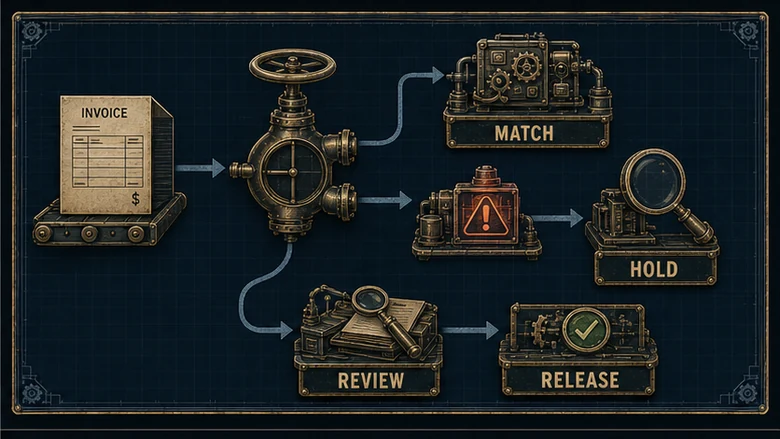
Design Controls Without Freezing the Plant
Control strength comes from independent facts and visible authority, not from adding approvers to every purchase. The 2025 U.S. GAO Green Book, effective for federal fiscal year 2026, treats segregation of duties as a control activity and also recognizes fraud and improper-payment risks. A manufacturer can apply the same design logic without pretending federal rules are its own policy.
| Risk | Preventive control | Detective evidence | Owner |
|---|---|---|---|
| Unauthorized commitment | Approval threshold and no self-approval | After-the-fact PO report | Budget owner |
| False or excess receipt | Receiver independent of buyer and AP | Receipt reversals and lag report | Receiving manager |
| Invoice overpayment | Three-way match and tolerance hold | Override and exception report | AP manager |
| Fraudulent payment change | Independent supplier-bank verification | Vendor-master change log | Controller |
| Duplicate payment | Normalized duplicate check | Confirmed duplicate register | AP operations |
Separate incompatible duties, then add a compensating review
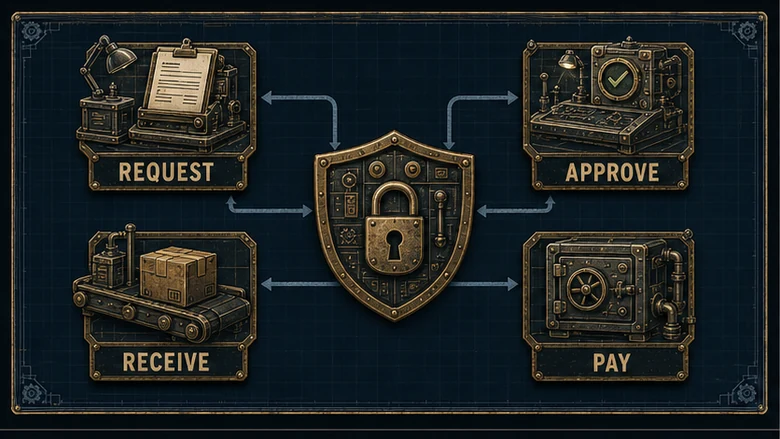
Do not let one person request, approve, receive, enter the invoice, and release payment for the same transaction. Small plants may not have six people, so separate the highest-risk pairs: supplier-master change from payment release, receipt from invoice approval, and request from approval. Have an owner or controller review the remaining combined duties after the transaction.
Set thresholds on total commitment, not document fragments
Approval thresholds should consider total PO value, amendments, connected releases, capital classification, supplier risk, and the period over which related requests are aggregated. Otherwise, a requester can split one commitment into smaller documents below the limit. Budget availability is an input to approval, not proof that the purchase is allowed.
Give emergency buys and payment cards their own controlled lane
A procurement card can suit low-value, low-risk, non-inventory purchases when it carries a cardholder limit, permitted merchant categories, receipt requirement, cost coding, and independent statement review. It should not become the path around an unavailable approver. Emergency plant buys need a named reason, temporary authority, receipt evidence, and next-day review so urgency remains visible.
Automate the Documents, Not the Missing Work
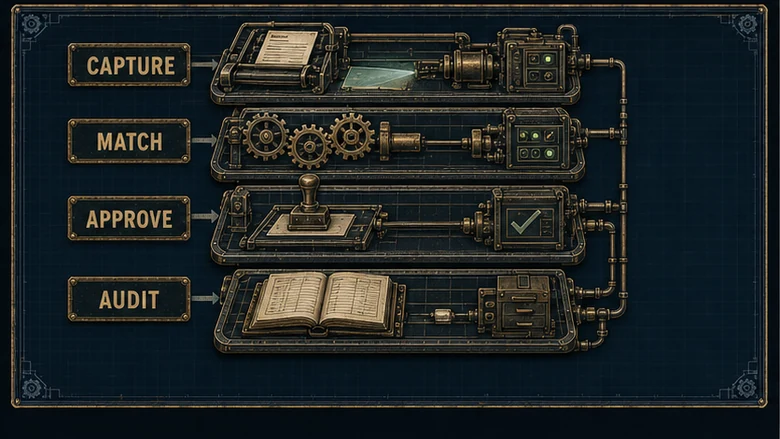
Accounts payable automation and OCR can capture invoice fields, validate supplier and PO references, detect likely duplicates, run match rules, route exceptions, collect approvals, and schedule eligible payments. They reduce typing and waiting. They do not know that four rejected parts are already in quarantine when receiving posted all 100 as accepted.
SAP’s P2P overview places purchasing and accounts payable in one connected flow and describes PO creation, receipt tracking, and invoice checking against the order and delivery. That connection is the value. Automating only invoice capture leaves the missing receipt and wrong PO upstream.
| Automation can | Automation cannot |
|---|---|
| Extract invoice headers and lines | Confirm physical accepted quantity without a receipt |
| Check duplicates and policy fields | Decide whether an emergency purchase was justified |
| Match within approved tolerances | Repair wrong item, unit, or supplier master data |
| Route exceptions and measure age | Make an unnamed owner act |
| Prepare approved payment batches | Independently verify a changed bank account |
Keep ERP as the transaction and accounting record even when a WMS, quality system, supplier portal, or AP platform performs a step. If stock accuracy and receiving are the unresolved problem, the decision sits closer to the manufacturing inventory software layer than to invoice OCR. Define which system owns each field and how failed integrations are reconciled.
PRACTICAL TEST
Before buying AP automation, sample 100 recent invoices. Tag each manual touch as data entry, missing PO, missing receipt, price variance, quantity variance, duplicate review, supplier-data issue, or approval wait. Automate the largest controllable cause. Do not call every touch an OCR problem.
Use Procurement Analytics to Manage Exceptions
Procurement analytics should expose where commitment, receipt, and payment separate. Track the process by reason and owner, not just one average cycle time. A faster invoice queue that clears by overriding mismatches is worse control with a better dashboard.
| Metric | What it reveals | Cut it by |
|---|---|---|
| Requisition-to-PO time | Approval and buyer delay | Plant, value band, approver |
| PO coverage | How much spend enters the controlled lane | Supplier, category, requester |
| First-pass match rate | Document and receiving quality | Exception reason, supplier, buyer |
| Receipt lag | Time between physical acceptance and system receipt | Dock, shift, item class |
| Exception age | Blocked cash and supplier friction | Owner and reason code |
| On-time payment | Execution against agreed terms | Supplier and payment method |
PO coverage = Invoices tied to a valid PO ÷ Total invoices received × 100First-pass match rate = Invoices matched without manual exception ÷ Total invoices matched × 100Publish numerator, denominator, exclusions, and time window beside each percentage. Separate invoices that legitimately follow a non-PO policy. Count a duplicate as prevented value only after investigation confirms it would otherwise have been paid. Treat days payable outstanding as a cash measure, not a target to delay suppliers beyond agreed terms.
Frequently Asked Questions
Procure to pay is the controlled business process from an internal purchase requisition through supplier payment and accounting record. It covers approval, purchase order creation, goods or service receipt, invoice capture, matching, exception resolution, payment, and audit evidence. It connects purchasing, receiving, quality, accounts payable, treasury, and the requesting department.
A three-way match compares the purchase order, accepted goods or service receipt, and supplier invoice before payment. It tests whether the billed item, unit, quantity, price, and other controlled charges agree with what was authorized and accepted. Differences outside approved tolerances are held and routed to the buyer, receiver, quality team, or supplier.
Source-to-pay begins earlier and is broader. It includes supply-market analysis, sourcing events, supplier evaluation, negotiation, contracting, and the later purchasing and payment transaction. Procure-to-pay is the transactional subset that starts with a purchase requisition once a supplier path exists and ends with payment and a posted record. Supplier choice belongs upstream.
A purchase requisition is an internal request for permission to buy a specified good or service. It normally states the item or scope, quantity, unit, required date, delivery location, cost object, business reason, and suggested supplier or contract. Approval authorizes purchasing to create a PO; the requisition itself is not sent as the supplier order.
Maverick spend is purchasing outside an organization’s approved supplier, contract, catalog, price, or approval path. It often appears as an invoice with no prior PO or as an after-the-fact requisition. The risk is not only price; the bypass can skip budget, quality, cybersecurity, safety, tax, and segregation-of-duties controls.
