
A buyer who found your shop, read your capability page, and decided you can make their part still has one obstacle left: your RFQ form. It is the last step between a serious enquiry and a quote you can actually price, and it is where most manufacturer websites quietly lose the work.
By the time that buyer reaches the form, most of the decision is already made. 6sense’s survey of 934 B2B buyers found that buying groups complete about 70% of their journey before they contact a seller. The RFQ form is where that invisible research finally becomes a request you can see and act on.
Two failure modes cost the most. A bare “Contact us” box asks for nothing an estimator can quote, so every submission starts a round of back-and-forth. A bloated form asks for so much that the buyer with a real job to price gives up halfway. A converting RFQ form sits between the two: enough to quote, little enough to finish.
This guide covers which fields to include and which to cut, how to lay the form out for desktop and mobile, and where the submission should go the moment a buyer hits send. It is about the form on your own website, not the procurement template a buyer downloads to send you.
Direct answer — What makes an RFQ form convert?
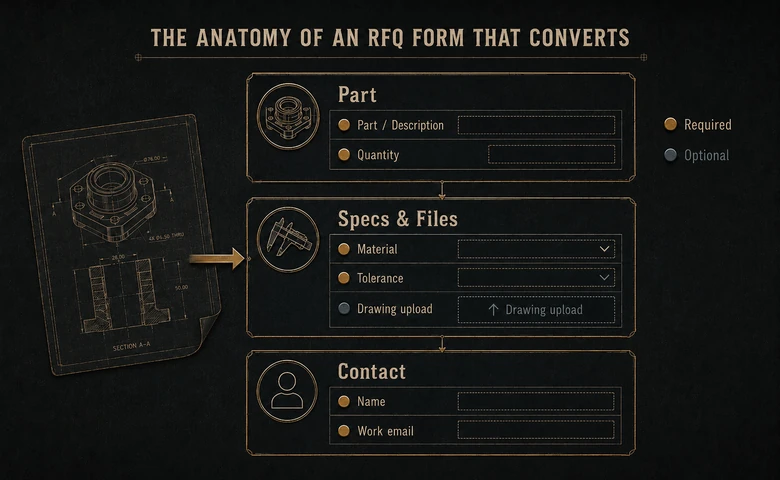
An RFQ form converts when it asks only what an estimator needs to price the job and nothing that stalls a serious buyer. Require just the part or description, quantity, a work email, and a drawing or file upload; make material, tolerance, target date, and delivery location optional. Group the fields into part, specs, and contact, keep it a single mobile-friendly column, and route every submission to a monitored quoting inbox with a same-day acknowledgment. A converting form is the shop’s own web form, not a downloadable procurement template.
Key Takeaways
- An RFQ form has to convert on two axes at once: enough detail to quote, few enough fields to finish.
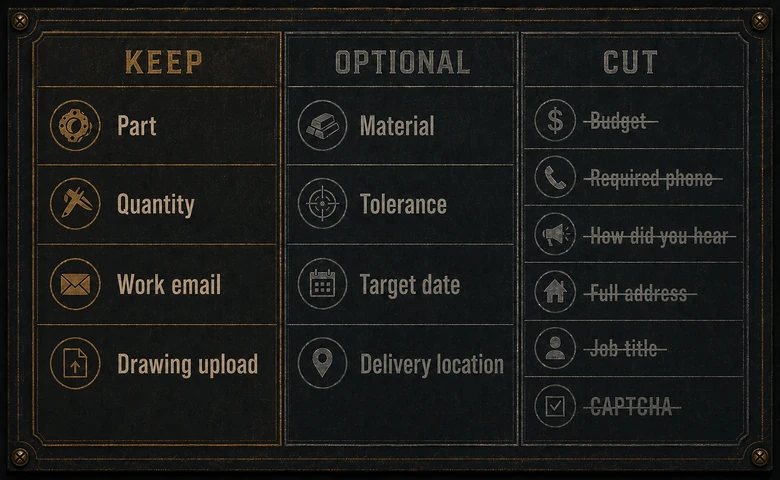
- Require only four fields — part or description, quantity, a work email, and a file upload. Make everything else optional.
- Cut the fields that carry no quoting value: budget up front, a required phone number, “how did you hear about us,” and a CAPTCHA wall.
- A drawing or CAD upload is the single highest-value field. It turns a vague enquiry into a spec your estimator can price.
- The form is only half the job. Where the submission lands, and how fast you acknowledge it, decides whether the RFQ becomes an order.
What an RFQ form is, and how a converting one differs
An RFQ form is the web form a manufacturer puts on its site so a buyer can request a quote for a specific part or job. A request for quotation, or RFQ, asks you to price defined work, so the form’s only job is to collect exactly what an estimator needs to return a number.
Search “RFQ form” and most of the results are downloadable templates: the Excel, Word, or PDF a buyer fills in to send out to suppliers. That is the buyer’s side of the same transaction. This is the seller’s side, the form on your website that a qualified buyer completes to reach you, and the one you actually control.
The form is the payoff of everything above it. A precise capability page that proves you run the process, hold the tolerance, and carry the certification does the qualifying; the RFQ form is where a convinced buyer acts on it. A strong page feeding a weak form still loses the quote, which is why the two belong to one design job, not two.
The field-rules table: which fields to include, which to cut
To decide any field, ask one question: does an estimator need it to price the job? If the answer is yes, include it. If a field only serves your marketing or your curiosity, cut it, because every field you keep is one a buyer has to get past.
The right fields do double duty. They hand your estimator a quotable spec, and they quietly screen the tire-kickers who won’t spend two minutes describing a real job — the same “form that filters” idea behind turning industrial search demand into qualified quotes. The table below sorts the fields a manufacturing RFQ form actually needs from the ones that just add friction.
| Field | Include? | Why |
|---|---|---|
| Part name or description | Required | An estimator cannot price an unnamed part. One short text field is enough to start. |
| Quantity (and quantity breaks) | Required | Process, tooling, and unit price all turn on volume. Ask for the quantities that matter, not a single number. |
| Work email | Required | You need a way to reply. Email beats a required phone number, which forces a channel many buyers avoid. |
| Drawing / CAD / spec file upload | Required (or prominent) | The single field that most de-risks the quote. Accept PDF, STEP, DXF, and native CAD. |
| Material and grade | Optional | Many buyers know it; some want you to advise. Useful, but rarely worth blocking the form over. |
| Tolerance or critical dimensions | Optional | Sharpens the quote and flags hard work early. Offer it; the buyer with a drawing will skip it. |
| Target date / need-by | Optional | Surfaces rush jobs and capacity fit without gating the serious buyer who hasn’t set a date yet. |
| Finish and secondary processes | Optional | Anodize, plating, heat treat. Relevant to price, but the buyer can add it or you can ask on reply. |
| Delivery location / ZIP | Optional | Affects freight and tax, not the base quote. Collect it, don’t require it to start. |
| Company name | Optional | Helpful context for your estimator, but not something to lose a form over. |
| Target price / budget up front | Cut | Buyers resist naming a budget, and you quote the part, not their ceiling. Pure friction. |
| Required phone number | Cut | Forces a channel and signals a sales call. Offer it as optional for buyers who prefer to talk. |
| “How did you hear about us?” | Cut | An analytics question with no quoting value. Track the source with your form tool instead. |
| Full mailing address | Cut | Not needed to quote. Collect it at the purchase order, not the enquiry. |
| Job title / company size | Cut | Lead-scoring fields belong in your CRM, not on the RFQ. They cost completions and quote nothing. |
| CAPTCHA / forced account creation | Cut | Abandons real buyers to stop a few bots. Use spam filtering behind the form instead. |
PRO TIP
Set the required fields to the absolute minimum and label the rest “optional” out loud. A buyer who sees only four required fields starts typing; a wall of red asterisks sends them to the next shop.
Required versus optional: the friction math
Every required field is a small tax on completion, and the tax compounds. Require only what you must have to route and quote, then offer the rest as optional, so the buyer who has the detail can give it and the buyer who doesn’t can still reach you.
The pattern is well documented. HubSpot’s analysis of more than 40,000 landing pages found that conversion rates fall as form fields multiply, and that free-text boxes and drop-downs depress completion more than plain fields do. On an RFQ form, a required “describe your project” text area and a required “industry” drop-down cost you more finished forms than a simple part-and-quantity pair ever would.
Qualified RFQs = Form Starts × Completion Rate × Spec Completeness
Read the formula and the trade-off is obvious. Cutting fields lifts the completion rate; optional spec fields lift completeness without forcing anyone out; and the number that pays your estimators is the product of the three, not raw submissions. Chasing volume alone fills the queue with junk, which is why RFQ quality beats RFQ quantity as the figure to optimize.
Layout and mobile: how the form should be built
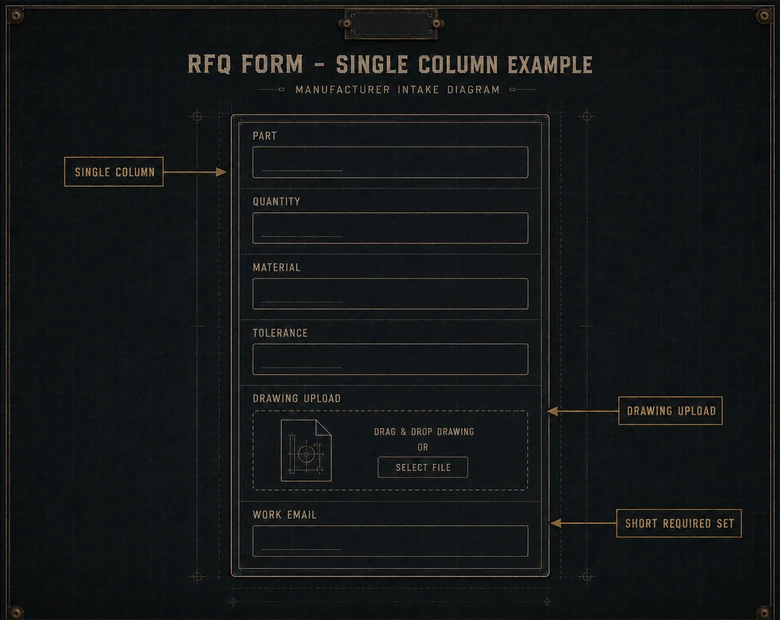
Build the RFQ form as a single column, grouped into three blocks a buyer reads in order: the part, the specs and files, then the contact details. One column tracks the eye straight down the page; two columns make people miss fields and mis-tab, and they break badly on a phone.
The form is one component of a site industrial buyers can actually use, alongside the specs, certifications, and load speed covered in the website features industrial buyers expect. Get the mechanics right: labels above the fields rather than placeholder-only, large tap targets, inline validation that flags a bad email on blur instead of after submit, and a visible file button. A buyer on a shop floor is often on a phone, and a form that fights the thumb never gets finished.
Self-service is now the expectation, not a nicety. In a March 2025 Statista+ study of 100 US B2B buyers across industrial manufacturing and three other sectors, 95% said self-service options improve purchasing efficiency, and 88% said the availability of self-service influences whether they keep buying. A clean form a buyer can complete without picking up the phone is part of what they now count as a working supplier.
IMPORTANT
Never gate the specs, lead times, or CAD files a buyer needs to write the RFQ behind the form itself. Buyers who can qualify you in the open arrive at the form ready to fill it in; buyers who hit a wall leave for the shop that let them look.
The drawing and CAD upload: the field that de-risks the quote
A file upload is the highest-value field on an RFQ form, because a drawing or CAD model turns a vague description into a spec your estimator can price with confidence. Accept PDF, STEP, DXF, and native CAD, state the accepted types next to the button, and set a generous size limit so nobody’s assembly bounces.
The file matters more than most shops assume. TraceParts, in a survey of 45,555 professional designers, found that 88% consider buying the part after they download its CAD model. Exchanging files sits close to the center of the industrial buying decision, not at the paperwork end of it, so the upload field is doing real sales work.
Once a drawing lands, the quote should be fast and accurate, which is where the form hands off to your quoting stack. Feeding the uploaded spec into a CPQ built for what you make turns the RFQ into a manufacturable quote instead of a week of estimator email and re-keyed numbers. That is the seller-side handoff; the customer buying the part controls its own requisition-to-payment process on the other side of the quote.
The best RFQ form is not the one that collects the most data. It is the one a buyer with a real drawing can finish in two minutes, and your estimator can quote without a single follow-up email.
Routing and response: what happens after submit
An RFQ form only pays off if the submission reaches someone who can quote it, fast. Decide where every RFQ lands before you publish the form: a monitored quoting inbox, your CRM, or a quoting tool, and never a single employee’s personal email where it dies on a holiday.
Route by capability wherever you can, so a machining RFQ goes to the machining estimator and a sheet-metal job goes to that cell instead of waiting in a general queue. Purpose-built manufacturing quoting software can triage submissions, attach the uploaded files to a quote record, and track turnaround so requests stop slipping between inboxes. The handoff still needs current material data: before an estimator commits a promise date, the quote should read current raw-material and WIP availability, not a spreadsheet snapshot.
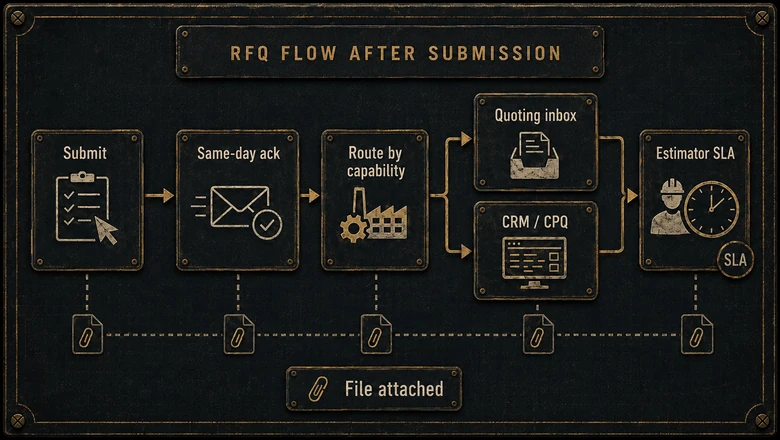
Acknowledge every submission the same day, automatically. A confirmation screen plus an email carrying a reference number and an expected turnaround tells the buyer the request landed and buys your estimator a little room. A buyer who reached most of the decision on their own expects a fast reply, and silence hands the job to whichever shop answered first. The bar here is lower than it looks: when we scored the public quote path on 25 manufacturer sites, 15 of them stated no turnaround at all, so a stated number is a differentiator before it is a courtesy.
How to design an RFQ form that converts, step by step
To design an RFQ form that converts, start from what an estimator needs to quote, strip everything else to optional, and wire the submission to a fast, accountable response. Six steps take a bloated or a bare form to one that returns quotable requests.
Workflow · about 2 hours
How to design an RFQ form that converts
Rework a manufacturer’s request-for-quote form so a real buyer can finish it fast and an estimator can quote it without follow-up.
-
List the fields an estimator actually needs
Start from what produces a number: part or description, quantity, and a drawing. Write down every field currently on the form and mark the ones that never affect a quote.
-
Require the minimum, make the rest optional
Require only part, quantity, work email, and a file upload. Set material, tolerance, target date, finish, and delivery location to optional, and delete the cut fields entirely.
-
Group the fields into three blocks
Order the form the way a buyer thinks: the part, then the specs and files, then contact details. Label each block so the form reads as three short steps, not one long wall.
-
Add a prominent drawing and CAD upload
Place a visible file field in the specs block. Accept PDF, STEP, DXF, and native CAD, state the accepted types, and set a size limit large enough for a real assembly.
-
Build it as one mobile column with inline validation
Use a single column, labels above fields, large tap targets, and validation that flags errors on blur. Remove any CAPTCHA wall and rely on spam filtering behind the form.
-
Route the submission and acknowledge it same day
Send every RFQ to a monitored quoting inbox, CRM, or quoting tool, route by capability, and fire an automatic reply with a reference number and an expected turnaround.
Walk your own form against these six steps and you’ll usually find two or three fields to cut and one file field to add. On most manufacturer sites that is the cheapest conversion gain available, because the traffic and the intent are already there; only the form is in the way.
Frequently Asked Questions
Require four fields: part or description, quantity, a work email, and a drawing or CAD upload. Offer material and grade, tolerance or critical dimensions, target date, finish, and delivery location as optional fields that sharpen the quote. Cut budget up front, a required phone number, and “how did you hear about us,” which add friction and quote nothing.
As short as it can be while still quotable. Require four fields and make everything else optional, because completion rates fall as fields multiply and free-text boxes and drop-downs hurt most. A buyer with a real job will add detail voluntarily when the required list looks short, so length works against you, not for you.
Make the upload prominent, and require it only if you never quote from a description. Some buyers request a ballpark before a drawing exists, so a hard requirement can cost early enquiries. Accept PDF, STEP, DXF, and native CAD, and make the field obvious, since it is the single input that most improves quote accuracy.
An RFQ form is the web form on a manufacturer’s site that a buyer fills in to request a quote. An RFQ template is the Excel, Word, or PDF a buyer downloads to send quote requests out to suppliers. Same transaction, opposite sides: the form is the one you host and control, the template is the one the buyer sends.
To a monitored quoting inbox, a CRM, or a quoting tool, never one person’s personal email. Route by capability so the right estimator sees each request, attach the uploaded files to the quote record, and send an automatic same-day acknowledgment with a reference number and an expected turnaround so nothing slips and the buyer knows it landed.
