
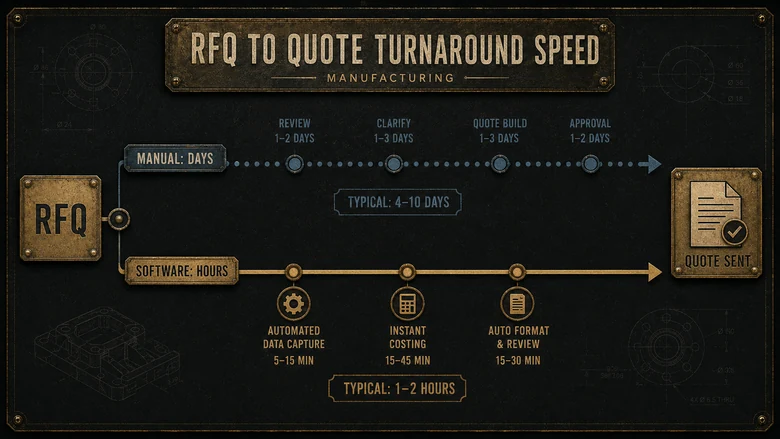
The fastest way to lose a job you could have won is to quote it slowly, or to quote it wrong. For most small and mid-market manufacturers, the quote is still built in a spreadsheet that a senior estimator guards like a family recipe, and it eats hours the shop does not have. Quoting software for manufacturing exists to fix both problems at once: it turns an RFQ, a part drawing, or a 3D model into a priced, buildable quote in minutes, with material, labor, and machine time costed the same way on every job.
The catch is that “quoting software” is really three different tools sold under one word, and buying the wrong one is expensive. This guide separates them, scores ten systems that manufacturers actually run, and shows you which type fits a CNC job shop, an engineer-to-order builder, or a high-mix plant already living inside an ERP.
Direct answer — What is quoting software for manufacturing?
Quoting software for manufacturing turns a customer’s RFQ, part drawing, or 3D model into a priced, manufacturable quote by estimating material, labor, machine time, overhead, and margin the same way on every job. Most systems fall into three types: dedicated quoting and estimating apps for job shops, quoting modules inside an ERP or MRP, and CPQ configurators for products with rules-based options. It is estimating, not paperwork, and the accuracy is what protects your margin.
Key Takeaways
- Quoting software estimates a job’s true cost (material, labor, machine time, overhead) and prints a consistent price, so quotes stop swinging with whichever estimator is in the building that day.
- Three tools get sold as “quoting software”: dedicated estimating apps (Paperless Parts, Costimator), quoting modules inside an ERP or MRP (MRPeasy, Fulcrum, DELMIAWorks), and CPQ configurators for configurable products, which are a separate buyer decision.
- Match the tool to how you quote: geometry-driven estimating for custom CNC and sheet-metal work, ERP-native quoting when the quote must flow straight into scheduling and purchasing.
- Speed is a revenue lever. Paperless Parts reports that a single part which takes up to two hours to quote by hand can be quoted in about 15 minutes.
- Pricing is mostly quote-only. MRPeasy is a rare published anchor at $49 to $149 per user per month (as of Q3 2026); most estimating platforms price by demo.
Methodology
How this comparison was built
- Scope
- 10 quoting and estimating systems that manufacturers run, across two types: dedicated estimating apps and ERP/MRP-embedded quoting. Selected for the make-to-order and job-shop market. CPQ configurators are scored in a separate guide.
- Sources reviewed
- Vendor product and pricing pages, the Tacton 2026 State of Manufacturing report (280 manufacturing leaders across 8 countries), Paperless Parts’ published quoting-time data, and public feature documentation.
- Date range
- Pricing and product status checked Q3 2026 (July 2026).
- Tools used
- A fixed rubric scoring each system on estimating method, quote-to-order flow, CAD or geometry input, pricing transparency, and fit by shop type. No affiliate links or paid placements.
- Limitations
- Most vendors publish no list price, so cost figures rely on demo-stage quotes and customer-reported ranges. Feature depth was assessed from documentation, not a hands-on trial of all ten systems.
- Editorial independence
- No vendor named here paid for placement, ranking, or coverage.
- Conflicts of interest
- Factory Investigator sells manufacturer website and RFQ-conversion services; no scored vendor was a client at review time.
What quoting software for manufacturing does
Quoting software for manufacturing turns a request for quote into a costed, buildable price by estimating the four things every job carries, material, labor, machine time, and overhead, then adding the margin you set. Good systems do it the same way every time, so the number does not move depending on who ran the estimate.
Quoted price = material + labor + machine time + overhead + target margin
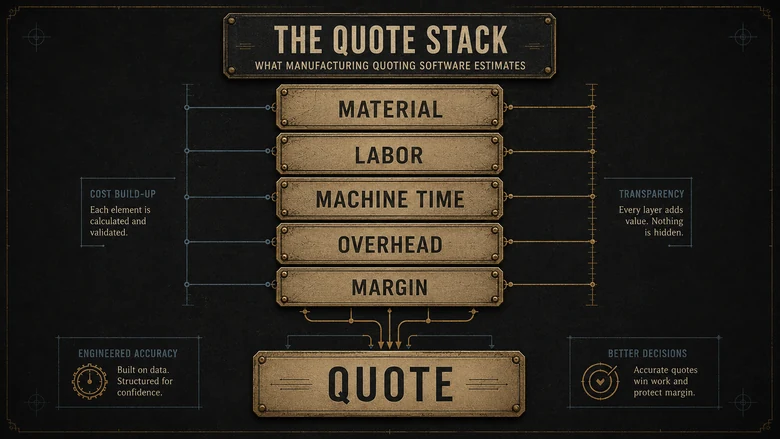
Underneath that stack, systems split on how they reach the estimate. Geometry-driven tools read your CAD file and pull the cost drivers straight off the model: stock size, cut length, bend count, setup count, and manufacturability warnings. Model-based tools like Paperless Parts work this way, compressing a multi-day estimate into a same-day quote. The other approach is a library of pre-built cost models: Costimator ships hundreds of industry-validated time standards for turning, milling, welding, laser cutting, and bending, so an estimator can price a part with or without a 3D model.
Both approaches beat a spreadsheet for one reason: they remember. Every quote reuses the same feeds, speeds, burden rates, and markups, so your pricing logic lives in the software instead of in one person’s head. When that person retires, the estimating knowledge does not walk out with them.
Signs your shop has outgrown spreadsheet quoting
You do not need software to know quoting hurts. You need it when the pain shows up in the numbers, on jobs won and lost and on margin that never quite lands where you planned. These are the signs a spreadsheet has stopped being enough:
- Quotes take hours, so the backlog grows and some RFQs get answered days late, or not at all.
- Two estimators price the same part and land 15% apart, because the logic sits in their heads instead of the system.
- You win jobs you later regret, because the estimate missed setup time, a secondary operation, or a material price that moved.
- Only one person can quote, and when that person is out, quoting stops.
- You cannot say what your real win rate is by customer or part type, because nobody tracks which quotes converted.
- Margin on completed work keeps drifting under plan, and no one can point to where it leaks.
If three of these describe your shop, the question is no longer whether to buy quoting software. It is which of the three types below fits how you actually work, because buying the wrong one wastes the money and leaves the pain in place.
Quoting vs CPQ vs ERP quoting: which one you actually need
The three tools sold as quoting software solve different problems, and the difference decides your shortlist before you look at a single vendor. Here is the fast version.
| Type | What it is | Use it when | Avoid it when |
|---|---|---|---|
| Dedicated quoting & estimating app | A standalone tool that estimates cost from a drawing or model and prints a quote | You quote custom parts to a print (CNC, sheet metal, fabrication) and speed plus accuracy is the whole game | You need the quote to drive scheduling, purchasing, and the shop floor in one system |
| ERP / MRP quoting module | Quoting built into the system that also runs BOMs, routings, inventory, and jobs | You want the accepted quote to become a work order, BOM, and PO without re-keying | You only need quotes and do not want to buy or migrate a full ERP |
| CPQ configurator | Rules-based configuration that prices a catalog product from valid option combinations | You sell configurable or engineered products with a defined option set and guided selling | Every job is a one-off to a customer drawing, with no repeatable option catalog |
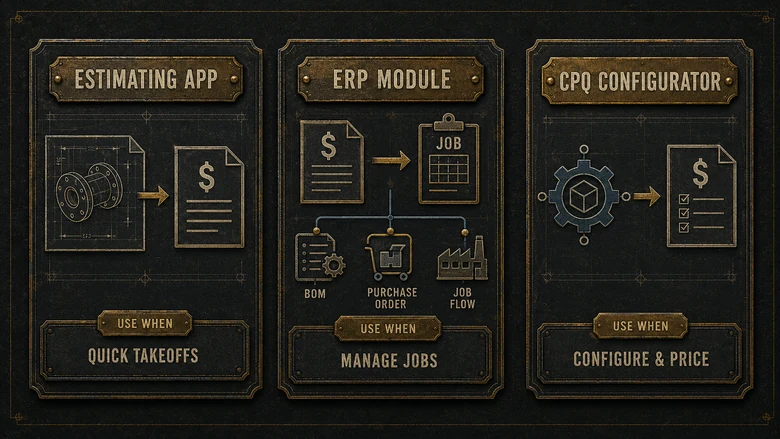
The line that trips people up is CPQ. Configurable-product makers are adopting it quickly: in Tacton’s 2026 State of Manufacturing report, a survey of 280 manufacturing leaders, 46% now run a third-party CPQ, up 19 points since 2022. But CPQ answers a catalog-configuration question, not an estimate-from-a-drawing question. If your products have rules-based options, the deeper buyer decision lives in our guide to CPQ software for manufacturing and where a configurator earns its keep, and this page will point you back there rather than repeat it.
So the decision block is short. Use a dedicated estimating app when you price custom parts fast and the quote is the product. Use an ERP quoting module when a won quote has to flow into jobs, purchasing, and the floor, which is the same reason shops weigh the wider split between MES, ERP, and PLM systems before they buy. Use a CPQ configurator only when you have a real option catalog to configure.
Match quoting software to how you quote
Start with the question your quotes actually answer, because that decides the tool, not the vendor demo. Three patterns cover most manufacturers.
Custom job shops (CNC, sheet metal, fabrication)
You price to a customer’s print, one part at a time, and win rate depends on turning the quote around before a competitor does. Geometry-driven estimating is the strongest fit here: upload the model, let the software read the features, and adjust the standards it proposes. This is the segment where a dedicated app usually beats an ERP module, because estimating depth and quote speed are the entire job.
Make-to-order and engineer-to-order builders
Your quotes carry engineering time, long BOMs, and outsourced operations, and an accepted quote needs to hand clean data to production. ERP-native quoting shines here, because the estimate becomes the BOM and routing without a re-key. Genius ERP and Global Shop Solutions are built around this ETO flow, and the estimate accuracy compounds when it feeds real job costing.
High-mix shops already on an ERP or MRP
If you already run an MRP, the quoting module you own may be closer than you think, and material cost is only trustworthy when it reads live inventory and purchase prices. That link between what you quote and what parts actually cost is why quoting and manufacturing inventory software that tracks raw-material and WIP cost belong in the same conversation, and why bolting a second estimating app onto an ERP you already pay for is often the wrong move. If the ERP itself is the open question, our buyer guide to the best ERP for small manufacturers covers that decision by production model.
The best quoting and estimating software for manufacturing at a glance
Here are the ten quoting and estimating systems worth a manufacturer’s shortlist, grouped by whether estimating is the whole product or a module inside a larger system. Pricing is marked “quote-only” wherever the vendor publishes none, which is most of them.
| Tool | Type | Best for | Estimating method | Starting price (Q3 2026) |
|---|---|---|---|---|
| Paperless Parts | Dedicated estimating | CNC, sheet metal, contract shops | Geometry-driven from CAD, with DFM flags | Quote-only |
| Costimator (MTI Systems) | Dedicated estimating | Should-cost across mixed processes | Feature-based cost models, with or without CAD | Quote-only (perpetual or subscription) |
| DigiFabster | Dedicated estimating + storefront | 3D printing, CNC, laser, online orders | Instant online quote from an uploaded file | Subscription, billed annually (quote) |
| Steelhead Technologies | Estimating inside a finishing ERP | Coating, plating, anodizing, heat treat | Process-based quote-to-order | Quote-only |
| MRPeasy | ERP / MRP quoting module | Small make-to-order shops | Costed BOM and routing inside the MRP | $49–$149 / user / mo (2-user min) |
| JobBOSS² (ECI) | Job-shop ERP quoting | Custom and make-to-order machine shops | Estimating from routings and job history | Quote-only |
| Genius ERP | ETO ERP quoting | Engineer-to-order, custom equipment | Estimating tied to engineering and BOM | Quote-only |
| Fulcrum | Modern cloud ERP quoting | Precision CNC, sheet-metal fab | Quoting with nesting and capable-to-promise | Quote-only |
| DELMIAWorks (IQMS) | Mid-market ERP/MES quoting | Plastics, repetitive and mixed-mode | Real-time costed quote to BOM and order | Quote-only |
| Global Shop Solutions | One-system ERP quoting | Job shops, make-to-order, ETO | Estimating from routers and actual costs | Quote-only |
Best dedicated quoting and estimating tools for job shops
Dedicated tools do one thing: get you from a drawing to an accurate, sendable quote fast. For custom shops where the quote is the product, this is usually where the money is best spent.
Paperless Parts
What it is: geometry-driven quoting and estimating for custom parts. Best for: CNC machining, sheet metal, and contract manufacturers that quote to prints. Standout: it reads the CAD model, flags design-for-manufacturability issues, pulls live material pricing, and runs a customer portal, which is how Paperless Parts reports cutting a two-hour manual estimate to roughly 15 minutes. Price: quote-only.
Costimator (MTI Systems)
What it is: should-cost estimating built on a library of validated cost models. Best for: shops that quote mixed processes and want defensible time standards. Standout: hundreds of pre-loaded cost models with speeds, feeds, and cycle-time calculators let an estimator price a part with or without a 3D model, and Costimator sells as a perpetual license or a subscription. Price: quote-only.
DigiFabster
What it is: instant online quoting and a self-serve storefront. Best for: 3D printing, CNC, and laser shops that want customers to upload a file and get a price without an estimator in the loop. Standout: DigiFabster analyzes the uploaded model, returns a quote, and takes the order and payment online. Price: subscription, billed annually (published as a quote).
Steelhead Technologies
What it is: quoting and process management for finishing shops. Best for: coating, plating, anodizing, and heat-treat operations that price by process, not by part geometry. Standout: Steelhead ties the quote to work orders, tracking, and a customer portal, which suits high-volume finishing where the same spec repeats. Price: quote-only.
Best quoting built into an ERP or MRP
When an accepted quote has to become a job, a BOM, and a purchase order without re-keying, quoting inside an ERP or MRP earns its keep. You give up some estimating depth for one system of record, and for many shops that trade is worth it. With VMI, however, the supplier can initiate replenishment from shared consumption data, so the same system of record must preserve price approvals and ownership rules even when the buyer did not start the order.
MRPeasy
What it is: a cloud MRP with quoting, costed BOMs, and routings. Best for: small make-to-order shops that want a real system without an enterprise bill. Standout: it is one of the few vendors here with public pricing, and the quote becomes a manufacturing order in the same tool. Price: MRPeasy lists $49 to $149 per user per month with a two-user minimum (as of Q3 2026).
JobBOSS² (ECI)
What it is: a job-shop ERP with estimating built for custom and repeat work. Best for: machine shops running high job counts that quote from routings and history. Standout: JobBOSS² carries estimating, scheduling, and shop-floor data in one place, so quote accuracy improves as actual costs feed back. Price: quote-only.
Genius ERP
What it is: an ERP purpose-built for engineer-to-order manufacturers. Best for: custom-equipment and machine builders whose quotes carry heavy engineering. Standout: Genius ERP links estimating to engineering and the BOM, which keeps ETO quotes honest when the design is still moving. Price: quote-only.
Fulcrum
What it is: a modern cloud ERP with quoting, nesting, and scheduling. Best for: precision CNC shops and sheet-metal fabricators that want live data end to end. Standout: Fulcrum pairs quoting with capable-to-promise and grouped-work nesting, so the quote reflects real capacity, not a guess. Price: quote-only.
DELMIAWorks and Global Shop Solutions
What they are: full mid-market ERP suites with estimating and quoting modules. Best for: shops that want one database from quote to ship. Standout: DELMIAWorks builds the quote on real-time expected cost and converts an approved quote to a BOM and sales order in a click, while Global Shop Solutions estimates from routers and actual costs. Both suit shops ready to standardize on a single system, and both connect quoting to the shop-floor execution covered in our guide to the best MES software. Price: quote-only.
How to choose quoting software
Shortlisting quoting software is a weekend of structured work, not a six-month committee. The point is to test each tool against your own worst quote, not the vendor’s clean demo part. Apply that same discipline in a normalized total-cost comparison by scoring every vendor against identical operating, implementation, support, and risk assumptions.
Workflow · a weekend
How to shortlist quoting software for your shop
Pick the right quoting or estimating tool by testing a small set against your real work before you sit through a single sales call.
-
Name the question your quotes answer
Decide whether you price custom parts to a print, configure a catalog product, or need the quote to run the whole job. That picks estimating app, CPQ, or ERP module.
-
Pull three real jobs
Grab one simple part, one that burned you on margin, and one complex assembly. These become the test set every tool has to quote.
-
Shortlist three vendors by type
Do not mix five configurators with two estimating apps. Choose three tools from the one category that fits step 1.
-
Quote your three jobs in each demo
Time it and check the number against what the jobs actually cost you. A pretty interface that misprices your hard part is a fail.
-
Test the handoff and the total cost
Confirm where an accepted quote goes next and ask for implementation, data-migration, and per-seat costs, not just the sticker price.
-
Check references in your process
Ask for a reference shop that runs your processes and volume, then ask them what the estimate misses. That answer is the real review.
PRO TIP
Score demos on your hardest quote, never the vendor’s sample part. The tool that lands your margin-killer job within a few points of actual cost is worth more than the one with the slickest portal.
What quoting software really costs
Quoting software pricing is mostly invisible, and that is a pattern, not an accident. Of the ten systems here, only MRPeasy and DigiFabster publish anything close to a number, and DigiFabster still routes you to a quote. Everyone else prices by demo, which means the sticker is only the start.
Budget for three layers. There is the subscription or license (MRPeasy anchors the low end at $49 to $149 per user per month as of Q3 2026, while dedicated estimating platforms and full ERPs land well above that). There is implementation and data migration, which for an ERP-grade tool routinely runs into the thousands. And there is the per-seat creep as more of the shop starts quoting. The same quote-only opacity shows up across the category, which is exactly why we mapped it in our investigation into what manufacturing software really costs once you add implementation and integration.
IMPORTANT
A cheap estimating tool that misprices your work is the most expensive software you can buy. If a system lands quotes 5% light, it does not save you money, it quietly gives your margin away on every job it wins.
Frequently Asked Questions
Quoting software for manufacturing turns an RFQ, drawing, or 3D model into a priced, buildable quote by estimating material, labor, machine time, overhead, and margin the same way on every job. It replaces the spreadsheet estimate, speeds up turnaround, and keeps pricing logic in the system instead of in one estimator’s memory.
Estimating is working out what a job will cost to make: material, labor, machine time, and overhead. Quoting is turning that cost into a customer-facing price by adding margin and terms. Most manufacturing quoting software does both, which is why the tools are also called estimating software.
Genuinely free, purpose-built quoting software is rare, and most shops that quote free are using a spreadsheet. A few MRP tools offer free trials or low starter tiers, but dedicated estimating platforms price by demo. For custom work, the cost of a mispriced quote usually dwarfs the software fee.
Most vendors publish no price. MRPeasy is a rare exception at $49 to $149 per user per month with a two-user minimum (as of Q3 2026). Dedicated estimating platforms and full ERP suites quote by demo and add implementation and migration fees, so plan for the total cost, not the sticker.
Not quite. CPQ (configure, price, quote) prices configurable products from rules-based option sets and guided selling. Job-shop quoting estimates a custom part from a drawing. They overlap, but if every job is a one-off to a customer print, you want estimating software, not a configurator.
