

Direct answer — What is manufacturing inventory software?
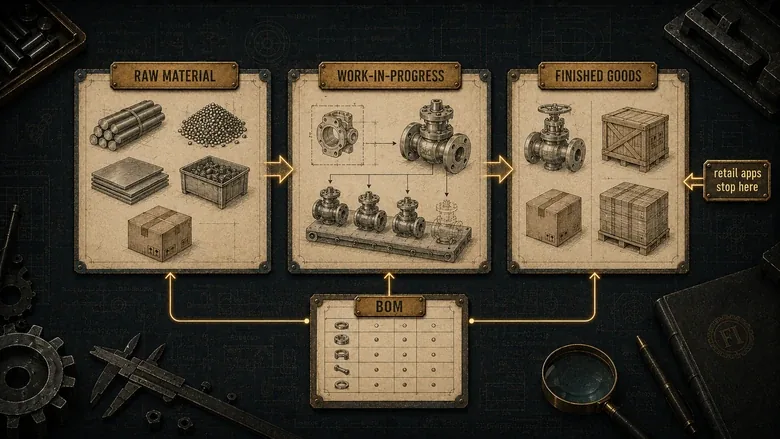
Manufacturing inventory software tracks stock across the three stages a factory actually holds it: raw materials, work-in-progress (WIP), and finished goods. It ties those levels to bills of materials, work orders, and reorder points. It differs from retail inventory apps, which track finished goods only, and from full ERP, which wraps accounting, CRM, and scheduling around the same inventory core. Lot and serial traceability is what regulated makers add on top.
Search “manufacturing inventory software” and you get two answers that don’t agree. Half the results are retail stock apps that count finished goods. The other half are full ERP suites that happen to include an inventory module. Neither is wrong, but neither tells a manufacturer where their software should actually live.
The gap matters because a factory holds inventory in three states at once: raw materials waiting to be cut or molded, work-in-progress sitting on the floor, and finished goods ready to ship. Most tools that call themselves inventory software see only the last one. Per Fluent Commerce’s 2023 Global State of the Industry survey, 58% of retailers and D2C brands run below 80% inventory accuracy (62% across the US and Australia). A tool that can’t see WIP is a fast way to stay there.
This guide compares nine systems by the question that decides the purchase: where should inventory live for how you build? We verified every price against the vendor’s own page in June 2026, named the rubric we scored against, and left the star rating off the tools whose sample is too thin or too gated to rate honestly. The licence is rarely the real cost, so treat this as the companion to our breakdown of what manufacturing software really costs.
Key Takeaways
- Manufacturing inventory software tracks raw materials, WIP, and finished goods together. Retail inventory apps usually track finished goods only, which is why they undercount a real factory.
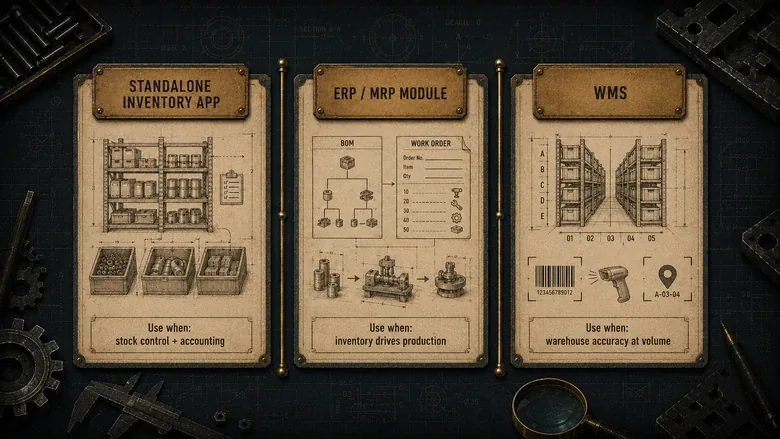
- Inventory lives in one of three homes: a standalone inventory app, an ERP/MRP module, or a warehouse management system. Pick the home before the brand.
- For most small and mid-size manufacturers, a shop-floor-native tool fits better and costs less than an enterprise ERP. Fishbowl, Katana, and MRPeasy lead that group.
- Lot and serial traceability is the line between general inventory tools and regulated-industry systems for food, pharma, medical, and aerospace.
- Published pricing starts around $29–$299/month; NetSuite and DELMIAWorks are quote-only. Implementation, not the licence, is usually the bigger number.
Methodology
How this comparison was built
- Scope
- Nine manufacturing inventory systems: seven scored against a six-part rubric, plus two quote-only enterprise/regulated platforms (Oracle NetSuite, DELMIAWorks) assessed for fit but not star-rated. SMB-to-mid-market focus, US pricing.
- Sources reviewed
- Each vendor’s own product and pricing pages; Capterra review aggregates (rating plus review count); the live Google SERP and AI Overview for “manufacturing inventory software”; and r/manufacturing buyer threads.
- Date range
- Pricing, plan names, and specs verified June 2026; Capterra ratings and review counts read June 2026.
- Tools used
- A six-part fit rubric: (1) raw-material/WIP/finished-goods tracking, (2) lot/serial/batch traceability, (3) BOM and reorder/MRP logic, (4) barcode/mobile/cycle counting, (5) accounting/ecommerce/ERP integrations, (6) pricing transparency and total cost. Vendor pricing pages and Capterra supplied the rating signal.
- Limitations
- No hands-on deployment: scores reflect documented capability and published pricing, not a bench test. Ratings are Capterra aggregates at one point in time and sit within a segment, not across tiers. Quote-only vendors carry no published price and no manufacturing-specific public rating, so we show neither rather than invent one.
- Editorial independence
- No vendor named here paid for placement, ranking, or coverage.
- Conflicts of interest
- Factory Investigator sells manufacturer website, SEO, and RFQ-conversion services; none of the vendors reviewed were clients at the time of writing.
Before the vendor list, the one distinction that sorts the whole market:
| Where inventory lives | What it is | Use it when | Avoid it when |
|---|---|---|---|
| Standalone inventory app (IMS) | A dedicated stock app that syncs to your accounting and store | You need stock control plus QuickBooks/Xero, without a full ERP | Inventory has to drive production planning across complex BOMs |
| ERP/MRP inventory module | Inventory built into a system that also runs BOMs, work orders, and planning | Stock levels and production are one decision and you want a single source of truth | You only need stock counts and reorder alerts today |
| Warehouse management (WMS) | Bin- and location-level control with directed pick, pack, and scan | The bottleneck is the warehouse, not the shop floor | Your “warehouse” is a few shelves beside the line |
What manufacturing inventory software actually tracks
Manufacturing inventory software tracks stock through three stages of production, not one: raw materials, work-in-progress, and finished goods. Each stage answers a different question. Raw materials tell you what you can start. WIP tells you what is committed and on the floor. Finished goods tell you what you can ship today.
Retail and ecommerce inventory tools were built for the third stage alone. They count units of a sellable SKU and reorder when stock runs low. That logic breaks the moment a “unit” is something you build, because the software has no concept of the components consumed to make it or the labor sitting in a half-finished batch.
The bridge between stages is the bill of materials. A BOM lists the components and quantities that go into a product, so when a work order is released, the software depletes raw materials, opens WIP, and books finished goods on completion. Without that chain, “inventory” is a spreadsheet of finished units and a guess about what’s left in the back.
WIP is also where inventory tracking meets the shop floor. Once seeing live production status matters more than counting boxes, you’re really looking at shop-floor systems built to track production in real time rather than an inventory app, and the better manufacturing inventory tools borrow a slice of that capability. Vention’s 2026 software-defined automation push is another reminder that automated cells still need clean WIP status, part movement, and completion data.
The three homes of inventory: app, module, or WMS
Every inventory tool lives in one of three homes, and the home matters more than the brand. Decide where inventory should sit for how you build, then shortlist within that group. The compact table above is the short version; here is what each home actually means.
Home 1: the standalone inventory app
A standalone inventory management system (IMS) is software whose main job is stock. It tracks quantities, locations, reorder points, and movements, and it syncs to your accounting and sales channels. Light assembly and BOMs are common; deep production planning is not. This is the right home when stock control is the problem and you don’t want to run your whole company through one system.
Home 2: the ERP/MRP inventory module
When inventory is inseparable from production, it belongs inside the system that plans production. That’s an MRP or ERP module, where the same data drives material requirements, work orders, and scheduling. The planning logic that turns a sales order into a material requirement is MRP, and where MRP ends and ERP begins decides how much system you actually need. The 2026 CAI PlanetTogether APS deal is another example of that middle layer growing around material requirements, finite capacity, and production scheduling. If inventory already lives inside the suite running your BOMs, the next question is simply which ERP fits your production model.
Home 3: warehouse management
A warehouse management system (WMS) controls inventory at bin and location level, with directed putaway, picking, packing, and scanning. It’s the right home when your constraint is moving product through a warehouse accurately at volume, not building it. Many small manufacturers think they need a WMS when a barcode feature inside their inventory app would do; you need a true WMS when pick paths and slotting start costing you real money.
Lot, serial, and batch traceability: the compliance lane
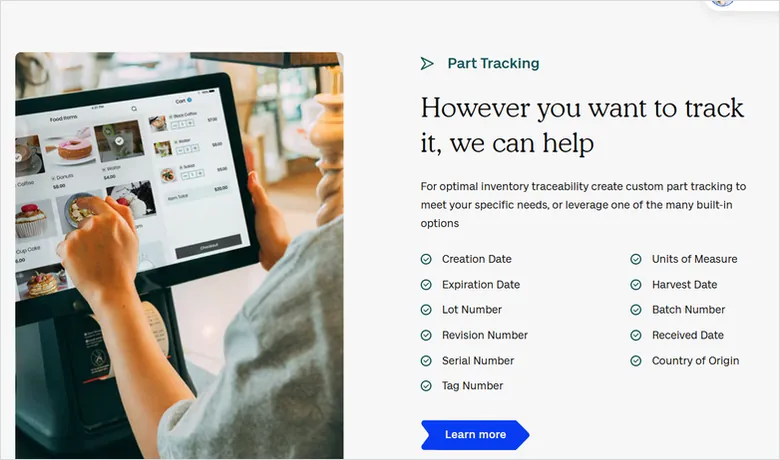
Traceability is the ability to follow a unit of inventory forward and backward through production: which raw-material lot went into which batch, and which customer received it. It’s the feature that separates a general inventory tool from one a regulated manufacturer can actually use.
If you ship into food, pharmaceuticals, medical devices, automotive, or aerospace, lot and serial genealogy isn’t optional. A recall or an audit means producing, in minutes, the full chain from supplier lot to finished serial number. A simple “batch” text field won’t survive that; you need recall reporting and lineage built into the data model.
Among the tools here, depth varies widely. Fishbowl and MRPeasy carry lot and serial tracking in their standard product. Katana gates it behind a paid Traceability add-on. For heavily regulated discrete manufacturing, purpose-built platforms like DELMIAWorks (Track & Trace) and QT9 go further, pairing genealogy with quality management and validation. Match the depth to your actual obligation, not to the scariest case you can imagine.
IMPORTANT
A “4.9/5” on a vendor’s own “best software” page is marketing, not a review aggregate. Check the score and the review count on G2 or Capterra first. A 4.2 across 1,100 reviews tells you more than a 4.9 a vendor printed about itself.
The 9 systems, by where inventory lives
The systems below are grouped by fit, starting with the tools most small and mid-size manufacturers should look at first. Prices and plan names were verified on each vendor’s own page in June 2026; ratings are Capterra aggregates read the same month.
Built for the shop floor: Fishbowl, Katana, MRPeasy
These three are inventory tools designed around manufacturing. Each tracks all three stages natively and runs work orders off a BOM, which is why the SERP’s AI Overview reaches for them first.
Fishbowl is inventory plus manufacturing built for shops already on QuickBooks or Xero. Best for: small-to-mid manufacturers who want BOMs, work orders, and lot/serial tracking that pushes clean numbers back to QuickBooks. Standout: the deepest QuickBooks integration in this group, plus MRP and barcode scanning. Starting price: $229/month (Essentials, billed annually), rising to $429 and $729; the Advanced tier is quote-based, and an implementation package is required (as of June 2026). Rating: Capterra 4.2 (1,123 reviews).
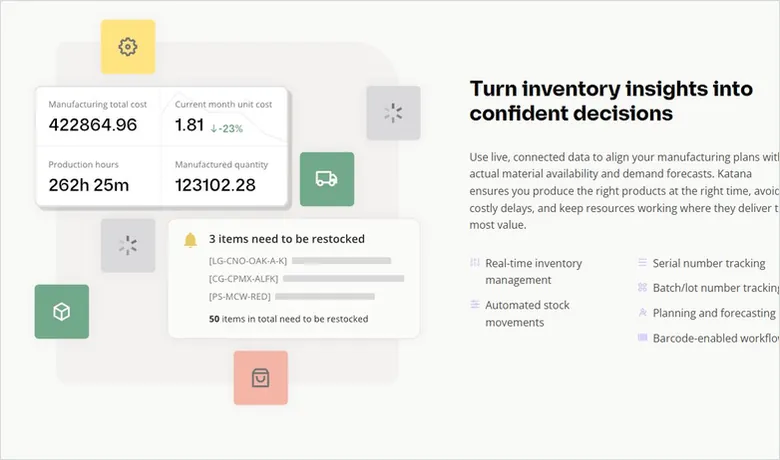
Katana is cloud inventory with a visual production floor. Best for: make-to-order and direct-to-consumer makers who want live inventory tied to Shopify and a drag-and-drop schedule. Standout: the clearest real-time view of material availability of any tool here. Starting price: a free plan (30 SKUs), then Core from $299/month; manufacturing, traceability, and warehouse functions are paid add-ons ($199, $249, and $149/month), and the Advantage tier is quote-based (as of June 2026). Rating: Capterra 4.6 (171 reviews).
MRPeasy is genuine cloud MRP at a small-shop price. Best for: small manufacturers who need real production planning, RM-to-WIP-to-FG tracking, lot traceability, and purchasing, not just stock counts. Standout: enterprise-style scheduling and material planning without the enterprise rollout. Starting price: $49/user/month (Starter), then $69, $99, and $149/user/month, with a two-user minimum; barcode scanning is included from the $99 Enterprise tier (as of June 2026). Rating: Capterra 4.5 (168 reviews).
Inventory-first with light assembly: Zoho Inventory, inFlow, Cin7 Core
These are inventory and order-management tools that handle assemblies and kits well, but stop short of full production planning. They suit finished-goods-heavy operations and light manufacturing.
Zoho Inventory is multichannel stock and order management with serial and batch tracking. Best for: sellers and light assemblers who live across Amazon, Shopify, and retail and want a low entry price. Key limit: it isn’t a production-planning or MRP tool, so true WIP tracking isn’t its job. Starting price: a free plan, then Standard $29, Professional $79, Premium $129, and Enterprise $249/month (US, billed annually, as of June 2026). Rating: Capterra 4.5 (417 reviews).
inFlow Inventory is simple stock control with assemblies and strong barcode support. Best for: small manufacturers and wholesalers who value ease of use over deep production features. Standout: one of the friendliest setups here, with QuickBooks and Xero on every plan. Starting price: Entrepreneur $129/month, Small Business $349, Mid-Size $699 (billed annually); Enterprise is quote-based and serial numbers are a paid add-on (as of June 2026). Rating: Capterra 4.6 (504 reviews).
Cin7 Core (formerly DEAR Systems) is inventory and order operations with standard assembly manufacturing. Best for: product brands scaling across channels that also do kitting or light manufacturing. Standout: broad ecommerce and accounting integrations, with MRP available as an add-on. Starting price: Standard $349/month, Pro $599, Advanced $999; the enterprise-grade Cin7 Omni is quote-based (as of June 2026). Rating: Capterra 4.3 (737 reviews).
The open-source route: Odoo
Odoo is modular, open-source business software whose Inventory app handles lot/serial tracking, barcode, multi-warehouse, and reorder rules. Best for: cost-sensitive shops with some in-house IT that want to add apps as they grow. Watch the catch: the Inventory app is free, but you only get one app free, so adding the separate Manufacturing app moves you to a paid plan at $31.10/user/month (Standard) or $61.00 (Custom), billed annually, as of June 2026. Rating: Capterra 4.2 (1,312 reviews for the wider Odoo suite, not the Inventory app alone).
Enterprise and regulated step-ups: NetSuite and DELMIAWorks
These two are where manufacturers go after they outgrow the tools above. Both are quote-only, so we assess fit rather than print a price or an invented star rating.
Oracle NetSuite is a cloud ERP with inventory, demand planning, warehouse management, and an advanced manufacturing module under one roof. Best for: multi-entity or fast-scaling manufacturers that need finance and production in one system. Reality check: Oracle publishes no list price, and NetSuite is repeatedly called overkill on cost and complexity for a single-site small shop. Pricing: quote-based (as of June 2026), typically an annual platform fee plus per-user seats plus modules.
DELMIAWorks (formerly IQMS, now part of Dassault Systèmes) combines ERP and MES on one platform with deep lot tracking and Track & Trace. Best for: regulated discrete manufacturers in plastics, automotive, aerospace, or medical devices that need genealogy, recall reporting, and real-time shop-floor data. Pricing: quote-based (as of June 2026).
Two more names you’ll meet in this space sit in the same ERP-module home: SAP Business One and Microsoft Dynamics 365 Business Central both run inventory inside a broader suite, and Acumatica is a common cloud alternative. If a full suite is where you’re headed, weigh them as part of an ERP decision rather than an inventory one.
The full comparison: 9 manufacturing inventory systems
Read this table within segments, not down a single column. A $29 multichannel app and a quote-only enterprise platform don’t compete; they answer different questions.
| System | Where inventory lives | Best for | RM·WIP·FG | Lot/serial | Key integration | Starting price (Jun 2026) | User rating (Capterra) |
|---|---|---|---|---|---|---|---|
| Fishbowl | Standalone + mfg module | QuickBooks shops | Full | Yes (lot, serial, expiry) | QuickBooks / Xero | $229/mo | 4.2 (1,123) |
| Katana | Standalone + light MRP | MTO / D2C makers | Full (add-on) | Add-on | Shopify / QuickBooks | Free / $299/mo | 4.6 (171) |
| MRPeasy | Cloud MRP module | Small shops needing real MRP | Full | Yes (lot) | QuickBooks / Xero / Shopify | $49/user/mo | 4.5 (168) |
| Zoho Inventory | Standalone IMS | Multichannel + light assembly | FG + assembly | Yes (serial, batch) | Zoho / QuickBooks | Free / $29/mo | 4.5 (417) |
| inFlow | Standalone IMS | Simple stock control | FG + assemblies | Add-on (serial) | QuickBooks / Xero | $129/mo | 4.6 (504) |
| Cin7 Core | Standalone IMS | Multichannel brands, light mfg | FG + assembly | Yes (batch/expiry) | Xero / QuickBooks / ecommerce | $349/mo | 4.3 (737) |
| Odoo | Open-source ERP module | Cost-sensitive, in-house IT | Full (with Mfg app) | Yes (lot/serial) | Native Odoo apps | Free / $31.10/user | 4.2 (1,312)* |
| Oracle NetSuite | Enterprise ERP + WMS | Multi-entity, scaling | Full | Yes | Native ERP suite | Quote-based | — |
| DELMIAWorks | ERP + MES | Regulated discrete mfg | Full | Yes (deep Track & Trace) | Native ERP + MES | Quote-based | — |
Ratings are Capterra aggregates read June 2026, shown with their review count. A dash means no manufacturing-specific public aggregate exists for a quote-only enterprise tool, so we show nothing rather than invent a star. *Odoo’s score covers the whole Odoo suite, not the Inventory app on its own.
What manufacturing inventory software really costs
The sticker price is the smallest line on the bill. Published plans in this comparison start near $29/month for multichannel stock control and around $229–$299/month for shop-floor-native tools, while per-user systems like MRPeasy and Odoo scale with headcount. NetSuite and DELMIAWorks publish nothing and quote on configuration.
What moves the real number is everything around the licence: implementation, data migration, integration work, add-ons, and per-user seats. Fishbowl requires an implementation package; inFlow charges a one-time onboarding fee; Katana’s manufacturing, traceability, and warehouse features each carry their own monthly add-on. The implementation and per-user math is where vendors stay quiet, and it routinely outweighs the monthly plan.
First-year cost = (monthly plan × 12) + implementation + add-ons + (per-user fee × seats × 12)Run that math for each finalist before you commit. A $49/user tool across eight users is $4,704 a year before implementation; a $229/month tool is $2,748 plus a setup package. The cheap-looking option isn’t always the cheaper one once seats and onboarding land.
PRO TIP
Run your real BOM through a 30-day free trial, not the demo data. Build one actual product, consume its materials, and ship it. The tools that make that loop painless on day one are the ones that stay painless at month six.
How to choose: match the tool to how you build
Choosing manufacturing inventory software is a sequence, not a feature checklist. Decide the home first, then test the specifics that matter for your floor. Use a standalone app when stock control is the problem and accounting sync is the priority. Use an ERP/MRP module when inventory and production are one decision. Add a WMS only when warehouse accuracy at volume is what’s costing you. And skip the enterprise suites until a single-site tool genuinely can’t keep up.
- Name your three inventory stages. Write down what raw materials, WIP, and finished goods look like in your plant. If WIP is real, you need a shop-floor-native tool, not a retail app.
- Pick the home. Standalone app, ERP/MRP module, or WMS: decide where inventory should live before you shortlist brands.
- Check the BOM and reorder logic. Confirm the tool builds multi-level BOMs and triggers reorders or work orders the way you actually plan.
- Confirm traceability depth. If you ship into food, pharma, medical, or aerospace, require lot/serial genealogy and recall reporting, not just a batch field.
- Map the integrations. List the systems it must talk to, QuickBooks, Xero, your store, your ERP, and test the sync during a trial.
- Price the first year, not the sticker. Add implementation, seats, and add-ons; make quote-only vendors put a written number in front of you before you sign.
One honest caveat: if your stock is fine but orders are thin, inventory software won’t fix the real problem. When the bottleneck is demand rather than accuracy, the website and RFQ side is where the money is, and you can start with a free manufacturer website investigation instead of a new inventory licence.
Frequently Asked Questions
By review volume, QuickBooks-connected tools like Fishbowl and broad platforms like Zoho Inventory and Odoo carry the largest user bases, while NetSuite dominates the enterprise end. “Most popular” rarely means “best fit” for a manufacturer, though. The right tool depends on whether you track work-in-progress and which accounting system you already run.
The 80/20 rule, or Pareto principle, says roughly 80% of your inventory value or sales comes from about 20% of your SKUs. In practice you count and tightly control that critical 20% (your A items) most often, and manage the long tail of B and C items with lighter cycle-counting rules.
Track inventory across all three stages, raw materials, work-in-progress, and finished goods, using barcodes or serial and lot numbers tied to bills of materials and work orders. The software depletes stock as materials are consumed and books finished goods as products are built, and regular cycle counts reconcile the records against the physical floor.
QuickBooks handles the accounting, but it isn’t a manufacturing system. QuickBooks Enterprise adds basic assemblies and inventory, yet it can’t run multi-level BOMs, work orders, or WIP tracking on its own. Most manufacturers pair QuickBooks with a tool like Fishbowl, Katana, or MRPeasy that pushes finished transactions back into it.
Inventory software tracks stock: what you have, where it is, and when to reorder. ERP runs the whole business around that stock, adding accounting, purchasing, production planning, CRM, and reporting. Inventory software is often one ERP module; you buy it standalone when you need stock control without the cost and rollout of a full ERP.